Fast Screen Recorder Review 2026: Simple Screen Recording for Windows
A lightweight Windows screen recorder by FastPCTools: record full screen, a custom area or several screens with mic and system audio, set an auto-stop timer, take screenshots and convert to MP4. Free trial, full licence $19.90 a year.
Our verdict
Easy, no-fuss recording for everyday screen work
Screen recorder
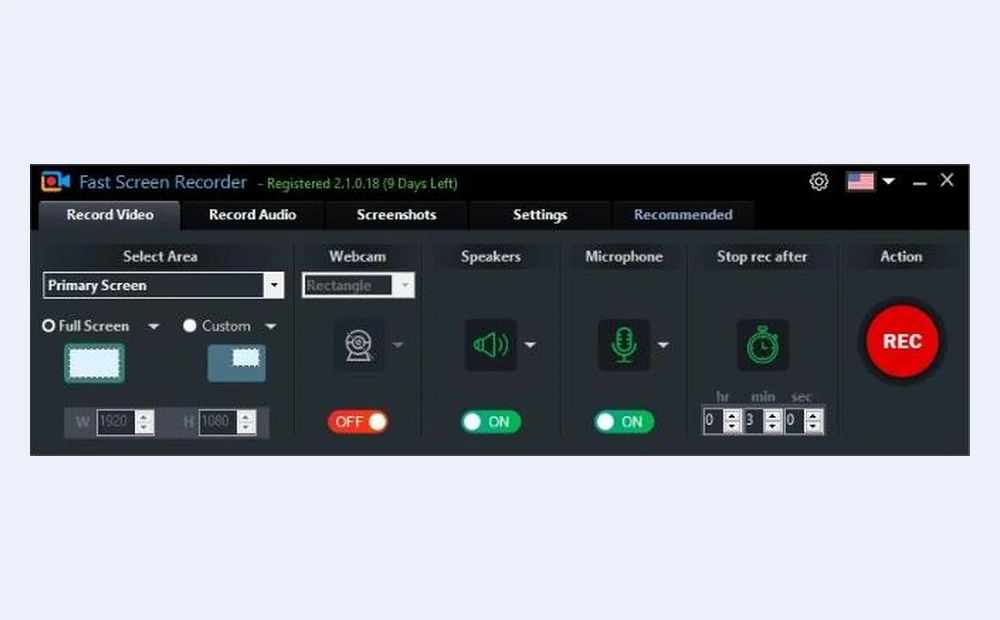
Fast Screen Recorder does one job and keeps it simple. One window holds everything: choose full screen, a custom area or another monitor, switch the webcam, speakers and microphone on or off, set a stop timer and press the big REC button. It records system sound and your voice together — ideal for meetings, online classes and tutorials — has an audio-only mode and a screenshot tab, customisable hotkeys, and converts its MKV recordings to MP4, MOV, AVI, WMV or MP3. FastPCTools (India, since 2013) says the installer is digitally signed, and there is a free trial to test it first. At $19.90 a year it is an affordable choice for people who want a ready-to-use recorder without learning complex software; heavy streamers and video editors will want a bigger tool.
What we like
- Everything in one window. Area, webcam, speakers, mic, timer and REC on a single screen.
- Mic + system audio together. Record meetings and tutorials with both sides of the sound.
- Auto-stop timer. Start a long class or webinar recording and walk away.
- Audio-only and screenshots. Record MP3 audio or grab screenshots from separate tabs.
- Converts for sharing. Turn MKV recordings into MP4, MOV, AVI, WMV or MP3.
- Try first, low price. Free trial, then $19.90 a year, with a 60-day refund period via Digistore24.
Good to know
- Annual subscription. The licence renews yearly at $19.90 until you cancel; cancelling keeps it working to the end of the year.
- Windows only. No Mac version; Windows 11, 10, 8.1 and 8.
- No built-in editor. You can convert, but trimming or adding text needs a separate editor.
- Recording others. Ask before you record meetings or calls — some countries require consent — and respect copyright.
What’s inside
What Fast Screen Recorder can do
Feature list from the FastPCTools product page and the Digistore24 order form (version 2.1).
Record video
- Full screen or custom areaWith or without the taskbar
- Multiple screensPick the primary or another monitor
- Webcam overlayTurn the camera on or off
- Mouse activityCursor and clicks recorded
Sound & timing
- System audioWhat you hear through the speakers
- MicrophoneYour voice, together or alone
- Auto-stop timerHours, minutes, seconds
- HotkeysStart, pause, resume, stop
Save & share
- Audio-only modeRecord MP3 from speakers or mic
- ScreenshotsOne key, during or outside a recording
- ConvertMKV to MP4, MOV, AVI, WMV or MP3
- Unlimited & no watermarkWith the full licence
How it works
From install to your first recording
Pick what to record
In the Record Video tab choose Primary Screen or another monitor, then Full Screen or Custom area — width and height can be set exactly.
Set sound and camera
Flip the Webcam, Speakers and Microphone switches. Speakers record what you hear; Microphone records your voice.
Set a timer and press REC
Use “Stop rec after” for long recordings, then press the red REC button. Pause and stop with your hotkeys.
Convert and share
Recordings are saved as MKV. Convert them to MP4 for YouTube, Google Drive or messaging, or to MP3 for audio.
Pricing
One plan, billed yearly
Price from the Digistore24 order form. The licence covers one PC for one year and renews yearly until you cancel.
Fast Screen Recorder
$19.90 per year
Renews yearly; cancel anytime.
- Unlimited recording time
- No watermark
- Mic + system audio, webcam
- Timer, hotkeys, screenshots, conversion
- Free updates during the year
- 60-day refund period via Digistore24
Taxes may be added at checkout where they apply. Need it on more PCs? The order form lets you choose a quantity. The seller’s own site may show different prices or bundles; buying through Digistore24, refunds go through Digistore24.
Setup guide
Setup guide: install, activate and record
From download to your first MP4 in about five minutes.
Download the free trial
Get the installer (about 5 MB) from the FastPCTools Fast Screen Recorder page and run it. Installation takes under a minute.
Test it before buying
Open the app and make a short test recording of your screen with sound to check it works on your PC.
Buy and activate
Check out through Digistore24. Your licence key arrives by e-mail; in the app choose Register and paste the key. The title bar then shows “Registered”.
💡 Keep the Digistore24 order e-mail — it has your refund and cancellation links.
Choose the area
Record Video tab → Select Area: pick the monitor, then Full Screen or Custom. For Custom, drag the frame or type width and height.
Set sound and webcam
Switch Speakers on for system sound, Microphone on for your voice, Webcam on for a face overlay. Use the arrows to choose devices.
Set hotkeys and the save folder
Settings tab: set start, pause and stop hotkeys and the folder where recordings are saved.
Record
Optionally set “Stop rec after”, then press REC. Use the hotkeys to pause or stop; the recording is saved automatically.
Convert and share
Convert the MKV file to MP4 (or MP3 for audio) and upload it, send it or keep it. Move old recordings off your PC to save space.
Recommended settings by use
Try these as a starting point; the settings tool above gives more cases.
Meetings
- Area: custom around the meeting window.
- Speakers ON + Microphone ON.
- Ask participants before you record.
Goal: a full record of the call.
Tutorials
- Area: the app you explain.
- Microphone ON, webcam optional.
- Pause hotkey between steps.
Goal: clear, step-by-step videos.
Online classes
- Area: full screen.
- Speakers ON, Microphone OFF.
- “Stop rec after” = class length.
Goal: record and walk away.
Six things worth knowing
$19.90 / year
Renews until cancelled.
Free trial
Test before you buy.
Windows only
11, 10, 8.1 and 8.
MKV first
Convert to MP4 to share.
No watermark
With the full licence.
60-day refund
Digistore24 Inc. order.
Your setup checklist
Free calculators
Recording tools you can use right now
Get the right settings for what you record, estimate the disk space you need, see the cost per recording and run a pre-recording checklist.
Best settings for your recording
Pick what you are recording. We suggest the area, audio and timer settings to use in Fast Screen Recorder.
How much disk space will it take?
Rough estimate of the file size for a screen recording, so you know how much free space to keep.
What does a recording cost you?
The licence is $19.90 a year. See the cost per recording for how often you record.
Before you hit REC: checklist
Tick these off for a clean recording every time.
Quick check
Is Fast Screen Recorder right for you?
Answer 5 quick questions.
Do you use a Windows 8 to 11 PC?
Do you record meetings, classes or tutorials?
Do you want a simple tool rather than a full video studio?
Is a yearly licence of $19.90 fine for you?
Do you need to live-stream or edit videos in the same app?
Also consider
Other tools from our PC Utilities & Media guide that suit different needs.
How to try it
Try Fast Screen Recorder in 4 steps
FAQ
Fast Screen Recorder questions answered
What is Fast Screen Recorder?
A Windows screen recorder by FastPCTools that records full screen, a custom area or multiple screens with microphone and system audio, plus audio-only recording and screenshots.
How much does it cost?
$19.90 per year for one PC through Digistore24. It renews yearly until you cancel.
Is there a free version?
Yes, you can download a free trial from FastPCTools to test it. The full licence unlocks unlimited recording time with no watermark.
Which Windows versions does it support?
Windows 11, 10, 8.1 and 8.
Can it record Zoom or Teams meetings?
Yes. Select the meeting window or full screen and turn on speakers and microphone. Ask participants before recording.
Does it record system sound and my voice together?
Yes. Speakers and Microphone can be on at the same time, or either one alone.
What format are recordings saved in?
MKV. You can convert them to MP4, MOV, AVI, WMV or MP3.
Is there a watermark?
Not with the full licence.
Can I use it on a Mac?
No, it is Windows only.
How do I cancel or get a refund?
Use the links in your Digistore24 order e-mail. Digistore24 Inc. orders come with a refund period of at least 60 days; cancelling the renewal keeps the licence working until the year ends.
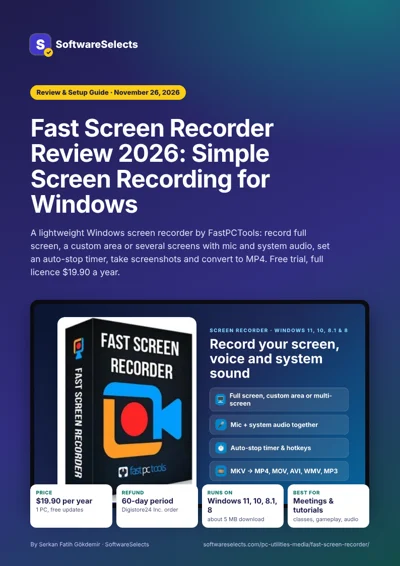
Free PDF
Download the Fast Screen Recorder review & setup guide
Everything on this page in a colourful, printable PDF: our verdict, the features, the price and renewal, the 8-step setup guide, recommended settings for meetings, tutorials and classes, and a pre-recording checklist.
- Verdict & features
- 8-step setup guide
- Settings by use
- Checklist & first-week plan
About this review
Who wrote it

Serkan Fatih Gökdemir
Founder and Editor, SoftwareSelects
Serkan builds websites, WordPress plugins and online calculator tools himself, so he looks at software the way a working user would. He has also worked for 15 years as a medical laboratory technician, with an education in chemistry, and brings the same habit of checking details carefully to every page: what a product actually does, what it costs, what the refund terms are and who it suits.
Sources: the FastPCTools product, purchase and refund pages and the Digistore24 order form for Fast Screen Recorder, checked on November 26, 2026. Images are the seller’s.
Questions about Fast Screen Recorder?
Tell our assistant what you want to record. It will suggest settings or a better-suited tool.
Details are based on the seller’s website and the Digistore24 listing as of November 26, 2026 and can change — always confirm the price and refund terms at checkout. SoftwareSelects may earn a commission from purchases made through our assistant’s links, at no extra cost to you. Affiliate disclosure
