Oltora Price Monitor Review 2026: Competitor Price Tracking Inside WordPress
A self-hosted WordPress plugin that watches competitor prices on WooCommerce, Shopify and other structured stores, keeps a price history and e-mails daily change summaries. $249 one-time for a 12-month single-site licence, no auto-renewal, 60-day money-back guarantee.
Our verdict
Price intelligence without another monthly SaaS bill
pick
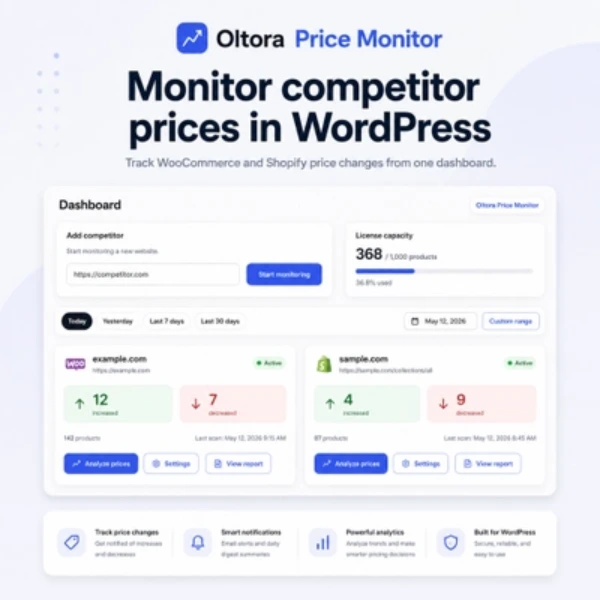
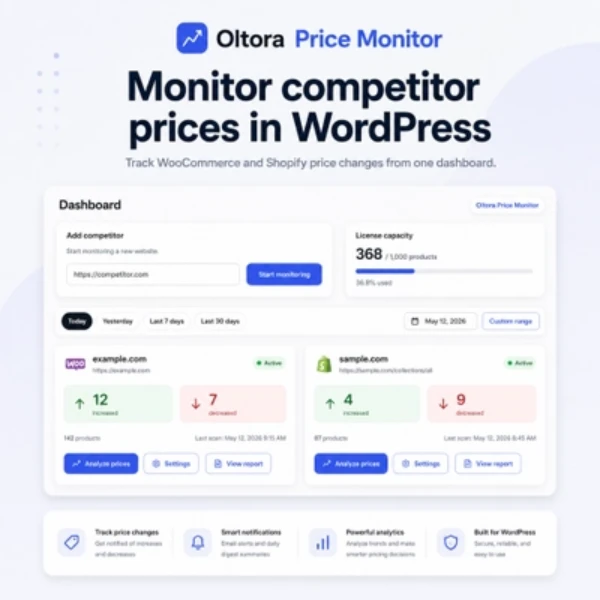
Most competitor price trackers are monthly SaaS tools that store your data on someone else’s servers. Oltora Price Monitor runs inside your own WordPress dashboard instead. You add a competitor store and it scans supported WooCommerce, Shopify and structured-data stores on the schedule you set — each competitor can have its own scan frequency — then shows price increases and decreases, keeps a full price history and change analysis, e-mails your team a daily summary and exports everything to CSV. The Single Site licence covers up to 1,000 competitor products and includes private plugin updates and support for 12 months, for a single $249 payment that does not renew automatically. It suits WooCommerce stores, agencies and e-commerce consultants who want price data on their own server. The offer is new and has no public website or documentation yet, so the 60-day money-back guarantee is your trial: test it on staging with your real competitors.
What we like
- Self-hosted. Runs in your WordPress; price data stays on your server.
- WooCommerce and Shopify. Plus other stores with structured product data.
- Price history. Change analysis shows trends, not just today’s price.
- Daily e-mail summaries. The team sees every increase and decrease.
- Flexible scans. Independent scan frequency per competitor; CSV export.
- No auto-renewal. $249 once for 12 months, plus a 60-day money-back guarantee.
Good to know
- New, little public info. No separate website, documentation or public reviews yet — test before relying on it.
- Store support varies. It covers supported WooCommerce, Shopify and structured stores; others may not work.
- 12-month licence. Updates and support last a year; after that you choose whether to buy again.
- Scan politely. Use moderate scan frequencies and respect competitors’ site terms.
What’s inside
What Oltora Price Monitor includes
From the Digistore24 order form and marketplace listing (November 2026).
Monitor
- Add competitorsPaste a store URL
- Supported storesWooCommerce, Shopify, structured data
- Up to 1,000 productsSingle Site licence
- Independent scan frequenciesPer competitor
Analyse
- Increases & decreasesAt a glance per store
- Price historyChange analysis over time
- Date rangesToday, 7 days, 30 days, custom
- ReportsPer competitor
Share
- Daily e-mail summariesFor your team
- CSV exportUse in sheets or BI
- Private updates12 months
- Support12 months
How it works
From install to your first price report
Install the plugin
Download the plugin after purchase, upload it in WordPress (Plugins → Add New → Upload) and activate your licence.
Add competitors
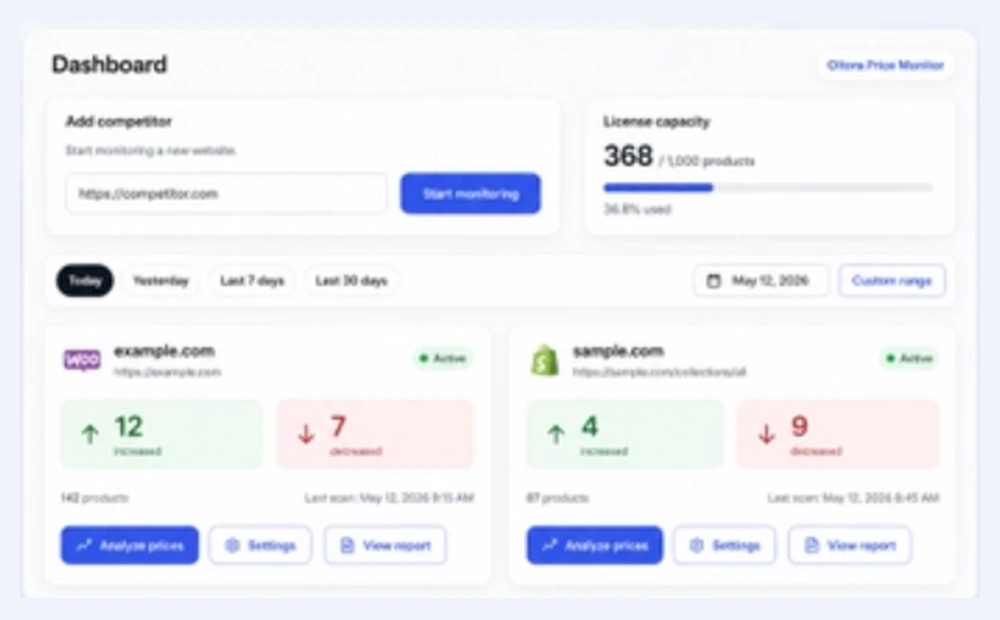
Paste a competitor store URL and start monitoring. The licence bar shows how many of your 1,000 products are used.
Set scan schedules
Give each competitor its own scan frequency — daily for close rivals, less often for others.
Act on the changes
Read the daily e-mail summary, check the price history and export to CSV when you review your own prices.
Pricing
One payment for a 12-month licence
From the Digistore24 order form. Not a subscription — nothing is charged automatically.
Single Site
$249 one-time
12-month licence, no auto-renewal.
- Up to 1,000 competitor products
- Price history and change analysis
- Independent scan frequencies
- Daily e-mail summaries and CSV export
- Private updates and support for 12 months
- 60-day money-back guarantee
When the licence period ends you decide whether to buy a new licence. Taxes, if any, are shown at Digistore24 checkout.
Setup guide
Setup guide: install and start monitoring
About 20 minutes. Use a staging site first.
Prepare a staging site
Make a staging copy of your WordPress site (many hosts offer one-click staging) and a full backup.
Buy the licence
Check out through Digistore24. Plugin access and licence information arrive after purchase — keep the order e-mail for the 60-day guarantee.
Install the plugin
WordPress → Plugins → Add New → Upload Plugin → choose the .zip → Install → Activate.
Activate your licence
Open the Oltora Price Monitor menu and enter the licence information you received.
💡 Licence missing? Contact the seller through your Digistore24 order.
Add your first competitor
Paste the competitor store URL in “Add competitor” and click Start monitoring. Start with your three closest rivals.
Set scan frequencies
Choose how often each competitor is scanned. Daily for close rivals is usually enough; avoid very frequent scans.
Add e-mail recipients
Set who gets the daily price-change summary — yourself, your pricing person or your team.
Review and go live
After a week, compare results with manual checks. If it works, install on your live site; otherwise request a refund within 60 days.
How to use it for your business
Starting points.
Small WooCommerce store
- Watch 3–5 close rivals.
- Only your best sellers.
- Daily summary to you.
Goal: never be surprised by a price drop.
Growing shop
- Group by category.
- Weekly CSV review.
- Use price history before matching.
Goal: smarter pricing decisions.
Agency / consultant
- One licence per client site.
- Monthly report from CSV.
- Keep scans moderate.
Goal: a pricing service for clients.
Six things worth knowing
$249 once
12-month licence.
No auto-renewal
You decide later.
1,000 products
Single Site limit.
Self-hosted
Your WordPress.
New offer
Test on staging.
60-day refund
Via Digistore24.
Your setup checklist
Free calculators
Pricing tools you can use right now
See what manual checks cost, check the 1,000-product capacity, decide whether to match a price drop and run a compatibility check.
How much time do manual checks cost?
Estimate the hours you spend checking competitor prices by hand.
Will 1,000 products be enough?
The Single Site licence monitors up to 1,000 competitor products.
Should you match a price drop?
A competitor lowered their price. See what matching does to your margin.
Before you buy: compatibility check
Tick what applies to you.
Quick check
Is Oltora Price Monitor right for you?
Answer 5 quick questions.
Do you run a self-hosted WordPress site?
Do you check competitor prices regularly?
Do your competitors use WooCommerce or Shopify?
Is $249 for a year fine for you?
Do you prefer a hosted SaaS with no plugin?
Also consider
Other tools from our Website & Marketing guide that suit different needs.


How to try it
Try Oltora risk-free in 4 steps
FAQ
Oltora Price Monitor questions answered
What is Oltora Price Monitor?
A self-hosted WordPress plugin that monitors competitor prices on supported WooCommerce, Shopify and structured e-commerce stores.
How much does it cost?
$249 one-time for a 12-month Single Site licence.
Does it renew automatically?
No. Nothing is charged automatically; after 12 months you decide whether to buy a new licence.
How many products can I monitor?
Up to 1,000 competitor products with the Single Site licence.
Which competitor stores work?
Supported WooCommerce and Shopify stores and other stores with structured product data.
Do I need WooCommerce on my own site?
It runs in WordPress; the seller lists WordPress as the requirement. Check with support for your setup.
Does it change my prices automatically?
It monitors and reports changes; the listing does not mention automatic repricing.
Is there documentation or a demo?
Not publicly at the time of writing; access and licence information come after purchase.
Is monitoring competitor prices allowed?
Checking public prices is common, but respect each site’s terms and keep scan frequencies moderate.
Can I get a refund?
Yes, within 60 days through Digistore24.

Free PDF
Download the Oltora Price Monitor review & setup guide
Everything on this page in a colourful, printable PDF: our verdict, features, the licence, the 8-step setup guide, plans by business type and a compatibility checklist.
- Verdict & features
- 8-step setup guide
- Plans by business
- Compatibility checklist
About this review
Who wrote it

Serkan Fatih Gökdemir
Founder and Editor, SoftwareSelects
Serkan builds websites, WordPress plugins and online calculator tools himself, so he looks at software the way a working user would. He has also worked for 15 years as a medical laboratory technician, with an education in chemistry, and brings the same habit of checking details carefully to every page: what a product actually does, what it costs, what the refund terms are and who it suits.
Sources: the Digistore24 order form and marketplace listing for Oltora Price Monitor, checked on November 27, 2026. Image is the seller’s product image.
Questions about Oltora Price Monitor?
Tell our assistant about your store and competitors. It will tell you whether Oltora fits.
Details are based on the seller’s website and the Digistore24 listing as of November 27, 2026 and can change — always confirm the price and refund terms at checkout. SoftwareSelects may earn a commission from purchases made through our assistant’s links, at no extra cost to you. Affiliate disclosure
