Smartwebchat Review 2026: An EU-Hosted AI Assistant for Your Website
An AI customer assistant that answers visitors from your own website and documents, captures enquiries, books appointments via Calendly or Cal.com and hands tricky cases to your team — hosted in the EU, with a 14-day free trial.
Our verdict
A careful, business-ready website assistant
Website chatbot
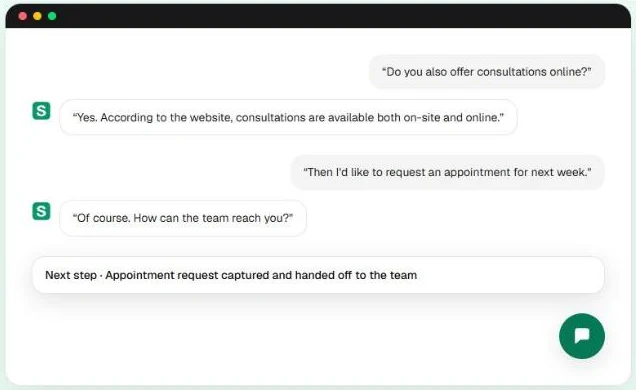
Smartwebchat does what a small business actually needs from a website chatbot: it answers from your own approved content, turns questions into enquiries or appointments, and passes anything tricky to a real person. It is unusually transparent — EU hosting at Hetzner, Mistral as the default AI model, a GDPR data processing agreement included, and an automatic notice that visitors are talking to AI. Setup takes minutes with no coding, and the 14-day free trial needs no payment details, so you can see it working on your own website before you pay anything.
What we like
- Answers from your content. It reads your website and documents and answers from that approved knowledge, not from guesswork.
- Turns chats into business. Lead capture, callbacks and appointment booking via Calendly or Cal.com right in the chat.
- Human handover. Complex requests go to your team by email, Slack or webhook — the assistant never pretends to be human.
- Privacy-first. EU hosting, Mistral AI in the EEA by default, a DPA under Art. 28 GDPR included and chats deleted after 30 days.
- No coding. Paste one snippet into WordPress, Shopify, Wix, Webflow, Squarespace or Jimdo.
- Free trial, monthly billing. 14 days free without a card, then cancel any month.
Good to know
- For businesses only. The Digistore24 offer is for business customers, not consumers; EU businesses can enter their VAT ID.
- Subscription. €149 a month excl. VAT for one assistant; the Agency plan is €499 for 15.
- Message allowance. 5,000 standard messages a month are included; extra messages cost €5 per 1,000.
- No refund window. Instead of a money-back guarantee you get the 14-day free trial and monthly cancellation.
What’s inside
Answer, guide, convert, hand over
Smartwebchat is built around four jobs. Launch languages are German, English, French, Spanish and Dutch.
Answer & guide
- Knowledge base (RAG)Website, PDFs, Q&A pairs and your own text
- Website analysisYour first assistant from your URL in minutes
- Proactive triggersGreet visitors after a set time on a page
- MultilingualDE, EN, FR, ES and NL at launch
Convert
- Lead captureTurn interest into enquiries with email alerts
- Appointment bookingCalendly or Cal.com inside the chat
- Analytics & logsTop questions, leads, bookings and costs
- WhatsApp channelSame assistant on WhatsApp via 360dialog
Control & privacy
- Human handoverEmail, Slack or webhook notifications
- Your brandingColours, logo, greeting and personality
- EU hostingHetzner servers, Mistral AI in the EEA
- API & webhooksConnect your CRM or ticket system
How it works
From your website address to a working assistant
Enter your website
Smartwebchat reads your public website and builds a first assistant from it — you can even preview it on your own site before signing up.
Add your knowledge
Upload PDFs such as price lists or brochures, type in question-and-answer pairs or paste your own text. The assistant answers only from this approved content.
Let it move visitors forward
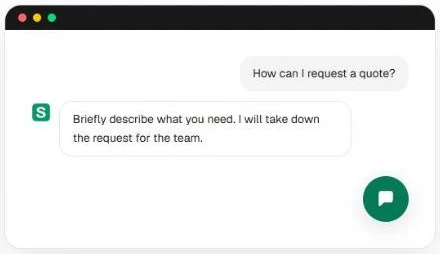
When a visitor is ready, the assistant captures the enquiry or books the appointment — and hands over to your team when a request needs a person.
Learn from the conversations
Analytics show how many conversations, leads and bookings you got, which questions come up most and what it costs — so you can improve your website and FAQs.
Pricing
Clear monthly pricing, no sales call
Prices from the Smartwebchat pricing page and the Digistore24 checkout, in euros excluding VAT. Billed monthly and cancellable each month.
Single Customer
€149 / month
One assistant for your own website. Excl. VAT.
- 1 AI customer assistant
- 5,000 standard messages per month
- Knowledge base from website and documents
- Lead capture, appointment paths and human handover
- Analytics, your colours and logo
- GDPR data processing agreement included
Agency
€499 / month
For agencies managing several clients. Excl. VAT.
- 15 AI customer assistants
- 25,000 pooled standard messages per month
- 2 users, separate knowledge per client
- Multi-tenant management, API and webhooks
- Priority support
Extras: €5 per additional 1,000 standard messages, €39 per extra user and €49 per extra agency assistant (all excl. VAT). Premium models are optional and charged per message. Non-profits with proof of charitable status can get the Single Customer plan free for at least 12 months, per the seller.
Setup guide
Setting up Smartwebchat on your website
Most businesses have a working assistant on their site within 20 minutes. Follow these steps in order — the knowledge base is what makes the answers good.
Start your free trial or subscribe
Register on smartwebchat.eu for the 14-day free trial — no payment details needed. Ready to pay? The Single Customer plan is sold through Digistore24 as a monthly subscription for businesses.
- On the Digistore24 checkout, order as a business and enter your VAT ID if you are in the EU.
- Your account is available right after payment; keep the order email for billing and cancellation.
💡 Use the trial on your real website — it is the best way to see what your visitors actually ask.
Create your first assistant
In the dashboard click Create assistant and enter your website URL. Smartwebchat reads your public pages and builds the first version of your assistant from them.
- It only uses your approved content as its knowledge base.
- You can have the website read again at any time after changes.
Fill the knowledge base
Add everything customers ask about. There are four ways: read your website, upload files (for example a price list or brochure PDF), type question-and-answer pairs or paste your own text.
- Phrase FAQs the way customers would ask them.
- Add opening hours, prices, service areas and how to book — the most common questions.
- Review and edit the automatically generated answers in the dashboard.
💡 The more specific your FAQs, the better the answers.
Make it look like your brand
Adjust the colours, logo, greeting and personality (for example professional or friendly) in the dashboard.
- Set a proactive trigger to show a message after a visitor spends some time on a page — an offer or a question.
- Want the chat on your own domain? Add it in the dashboard and complete the verification step.
Set up enquiries and handover
Decide what happens when a visitor is ready to talk: capture the enquiry, offer a callback or hand over to a person.
- Choose how your team is notified: email, Slack or a webhook to your CRM or ticket system.
- Handover can trigger automatically or when the visitor asks for a person.
Connect appointment booking
Connect your Calendly or Cal.com account so visitors can book directly in the chat window, without leaving your website.
- A Calendly or Cal.com account is required for booking.
Add the assistant to your website
In the dashboard open Embed code, copy the HTML snippet and paste it into your site immediately before the closing </body> tag.
- WordPress / page builders: paste the code into an HTML widget (or a header-and-footer code plugin so it appears on every page).
- Wix: Settings → Development & integrations → Custom Code → + Add Custom Code → paste → “Body – end” → Apply.
- Shopify, Webflow, Squarespace and Jimdo are supported too — follow the platform guide in the help center.
Test, then review analytics
Ask your assistant the questions customers ask most — on desktop and on your phone. Then check Analytics each week: conversations, top questions, leads, bookings and costs.
- Add a short note to your privacy policy about the AI chat (the DPA is included).
- Update the knowledge base whenever your offer or prices change.
Optional: WhatsApp, your own domain and privacy
Extend the same assistant beyond your website — and make sure your privacy policy reflects it.
WhatsApp channel
- Prepare a phone number that is not used in the regular WhatsApp app.
- Create your own 360dialog account and connect the number through Meta’s guided flow.
- Enter the 360dialog API key in Smartwebchat, and Smartwebchat’s webhook address in 360dialog.
- Meta reviews your company details — from minutes to two working days.
WhatsApp is the only part with extra third-party costs (360dialog/Meta).
Your own domain
- Open the domain settings in the dashboard.
- Enter your domain (for example chat.yourbusiness.com).
- Complete the verification step to prove you own it.
The assistant is then reachable under your domain.
Privacy checklist
- The DPA under Art. 28 GDPR is concluded automatically.
- Mention the AI chat and its providers in your privacy policy.
- Visitor chats are deleted automatically after 30 days.
- Choosing an OpenAI premium model may mean processing outside the EU — note it if you enable one.
You can export your account data as JSON at any time.
Six questions to add to your knowledge base first
“What are your opening hours?”
Include holidays and exceptions.
“How much does it cost?”
Prices or price ranges, and what is included.
“How do I book an appointment?”
Link to your Calendly or Cal.com booking.
“Do you also work in my area?”
List your service area or delivery zones.
“How long does it take?”
Typical waiting and delivery times.
“Which documents do I need?”
What customers should bring or send.
Your setup checklist
Free calculators
Work out what an AI assistant is worth to you
Two quick calculators: the enquiries you may be missing today, and whether the included message allowance fits your traffic.
Missed-enquiry calculator
How many customers slip away because nobody answers their question in time — and what are they worth?
A rough model: it counts only questions asked when nobody is there to answer. Use the 14-day free trial to see your real numbers.
Message allowance planner
The Single Customer plan includes 5,000 standard messages a month. Check if that covers your traffic.
Extra standard messages cost €5 (excl. VAT) per 1,000. Premium models use up the allowance faster.
Quick check
Is Smartwebchat right for you?
Answer 5 quick questions.
Do you run a business (practice, firm, trade, shop or agency)?
Do visitors ask the same questions again and again?
Do you get enquiries or bookings through your website?
Is data protection (GDPR, EU hosting) important to you?
Are you looking for a one-time purchase rather than a subscription?
Also consider
Other tools from our Website & Marketing guide that suit different needs.


How to try it
Try Smartwebchat for free in 4 steps
FAQ
Smartwebchat questions answered
What is Smartwebchat?
Smartwebchat is an AI customer assistant for business websites. It answers visitor questions from your own website and documents, captures enquiries, books appointments via Calendly or Cal.com and hands complex requests to your team.
How much does Smartwebchat cost?
The Single Customer plan costs €149 a month excluding VAT, billed monthly and cancellable each month. The Agency plan costs €499 a month for 15 assistants.
Is there a free trial?
Yes. After registering on smartwebchat.eu you can test it for 14 days free, without entering payment details.
Do I need technical skills?
No. You create the assistant from your website address and add it to your site by pasting one code snippet — WordPress, Shopify, Wix, Webflow, Squarespace and Jimdo are supported.
Where do the answers come from?
From your approved content: your website, uploaded documents, question-and-answer pairs and texts you add in the knowledge base.
What happens if it cannot answer?
It hands the conversation to you or your team and notifies you by email, Slack or webhook — automatically or when the visitor asks for a person.
Is Smartwebchat GDPR-compliant?
The seller follows GDPR requirements: data is stored in the EU, Mistral AI processes in the EEA by default, a data processing agreement (Art. 28) is included and visitor chats are deleted after 30 days.
Which languages does it support?
German, English, French, Spanish and Dutch are the launch languages.
Can it work on WhatsApp?
Yes. The same assistant can answer WhatsApp messages through a 360dialog account; WhatsApp is the only part with extra third-party costs.
Can I buy it as a private person?
No. The Digistore24 offer is only for businesses, not consumers.
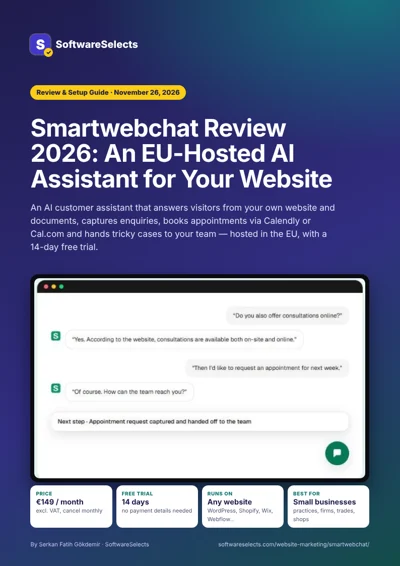
Free PDF
Download the Smartwebchat review & setup guide
Everything on this page in a colourful, printable PDF: our verdict, features, pricing, the full 8-step setup guide with embed instructions, WhatsApp and privacy steps, and a checklist you can tick off.
- Verdict & pricing
- 8-step setup guide
- Embed, WhatsApp & privacy
- Printable checklist
About this review
Who wrote it

Serkan Fatih Gökdemir
Founder and Editor, SoftwareSelects
Serkan builds websites, WordPress plugins and online calculator tools himself, so he looks at software the way a working user would. He has also worked for 15 years as a medical laboratory technician, with an education in chemistry, and brings the same habit of checking details carefully to every page: what a product actually does, what it costs, what the refund terms are and who it suits.
Sources: the Smartwebchat website (features, pricing, help center and trust pages) and the Digistore24 product listing and checkout, checked on November 26, 2026.
Questions about Smartwebchat?
Tell our assistant about your business and website. It will tell you if Smartwebchat fits — and how to set it up.
Details are based on the seller’s website and the Digistore24 listing as of November 26, 2026 and can change — always confirm the price and refund terms at checkout. SoftwareSelects may earn a commission from purchases made through our assistant’s links, at no extra cost to you. Affiliate disclosure
