Tube Magic Review 2026: AI Scripts, Titles & Tags for YouTube
An all-in-one AI toolkit for YouTube creators: viral-style scripts in your own voice, video ideas, keyword research, thumbnails, titles, descriptions and tags — from $41 a month with a 30-day money-back guarantee.

Our verdict
A complete YouTube workspace, from idea to upload
YouTube growth
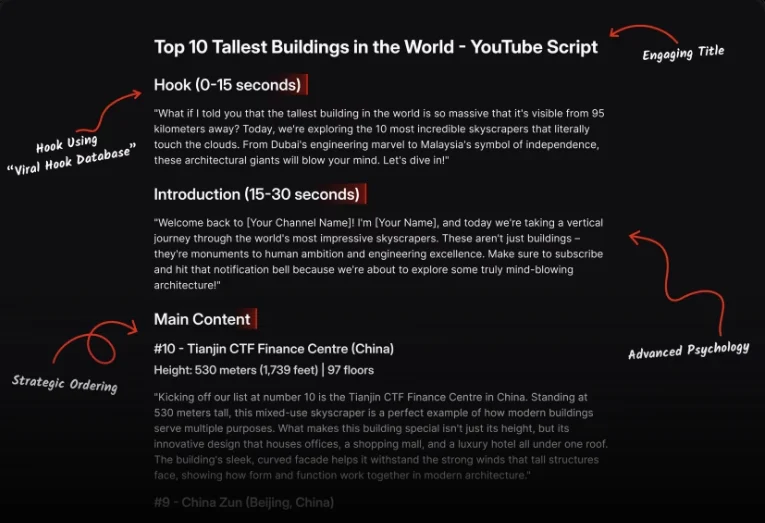
Tube Magic puts the whole YouTube workflow in one place: find an idea, research it, write the script in your channel’s own voice, then create the thumbnail, title, description and tags. It is one of the most popular products in the Digistore24 Software category, it is used by well-known creators — including a 1.2M-subscriber channel and a creator running 12 channels — and every plan comes with a 30-day money-back guarantee, so you can test it on your own videos without risk.
What we like
- Everything in one plan. All tools are unlocked on every plan — no feature tiers to compare.
- Up to 10 channels. Connect up to 10 YouTube channels in one account — great for multi-channel creators.
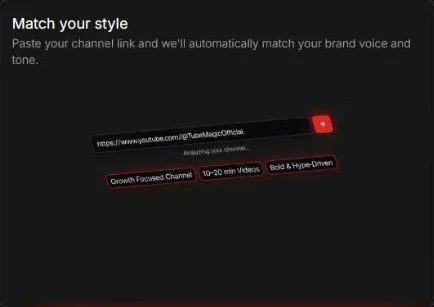
- Scripts that sound like you. Paste your channel link and Tube Magic matches your brand voice and tone.
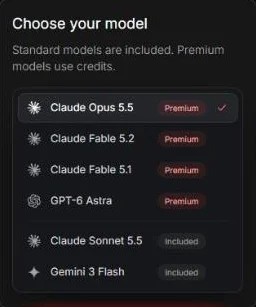
- Top AI models included. Claude Sonnet 5.5 and Gemini 3 Flash are included; premium models such as Claude Opus 5.5 and GPT-6 Astra run on credits.
- Works inside your AI. Connect ChatGPT, Claude or Cursor via MCP and use 89 Tube Magic tools by just asking.
- Safe to try. 30-day money-back guarantee and you can cancel the subscription at any time.
Good to know
- No free trial. Trials are paused; the 30-day refund window takes their place.
- Credits for premium extras. Premium models, thumbnails (20 credits) and the Agent use credits; standard models do not.
- Yearly plan extras. The Tube AI System course and 6,000 up-front credits come with the yearly plan.
- You stay the editor. Scripts are written fresh for each request — review facts and edit before publishing.
What’s inside
Everything you need, from idea to upload
Tube Magic is organised around a simple sidebar — Today, Agent, Ideas, Research, Scripts, Thumbnails and Channels. Titles, descriptions and tags come back in the language you write in.
Plan & research
- TodayDaily briefing: your channel stats, 3 video ideas and breakout videos in your niche
- Video ResearchFind outlier videos and turn them into reusable title formats
- Ideas ManagerSave, sort and plan months of video ideas
- Niche GeneratorSub-niche ideas by audience and channel style
Create
- Script Writer1 to 20 minutes, with Personas that learn your channel’s style
- Thumbnail GeneratorDescribe it, add your face photo or a YouTube reference, refine
- Video TimestampsChapters for your description
- Repurpose IdeaTurn one idea into new formats
Optimize & manage
- Tube Magic AgentOne chat for titles, descriptions, tags, scripts and thumbnails
- My ChannelsConnect up to 10 YouTube channels and browse their videos
- My GenerationsAll your scripts and thumbnails in one library
- MCP access89 tools inside ChatGPT, Claude, Cursor and more
How it works
From channel link to finished script in four steps
Match your style
Connect your YouTube channel (or paste its link). Tube Magic analyses your recent videos and picks up your brand voice, tone and typical video length.
Choose your AI model
Use the included standard models (Claude Sonnet 5.5 by default, or Gemini 3 Flash) or pick a premium model such as Claude Opus 5.5 for your most important scripts.
Set length and add inspiration
Choose a video length from 1 to 20 minutes and Tube Magic matches the word count. Add top-performing videos as inspiration — it extracts the best ideas and blends them with your own style.
Polish and publish
Review the script, then let Tube Magic Agent write the title, description and tags and create the thumbnail — all saved in the same workspace.
Pricing
One plan with every tool — monthly or yearly
Tube Magic has a single Premium plan. Pay monthly or save about 12% with yearly billing. Prices are in US dollars, from the seller’s pricing page and the Digistore24 checkout.
Monthly
$47 / month
Billed monthly. Cancel any time.
- All tools unlocked
- Up to 100 generations a day per tool (standard models)
- 500 credits every month
- Premium models and MCP access
- Priority support
Yearly
$497 / year
About $41 a month — saves around 12%.
- Everything in Monthly
- 6,000 credits a year, added up front
- Tube AI System course included
- Credits reset when the plan renews
Extra credits: 100 for $9, any time. The seller sometimes runs seasonal discounts for new customers — the current price is always shown at checkout.
Setup guide
Setting up Tube Magic and connecting your channel
From checkout to your first finished script takes about 15 minutes. Follow these steps in order — each one makes the next tool smarter.
Choose your plan and check out
Pick monthly ($47) or yearly ($497) on the Digistore24 checkout. Use the email address you want to log in with — Digistore24 sends your order confirmation and receipt there.
- Keep the Digistore24 order email: it contains your order ID and the link for refunds or cancellation.
- Starting with monthly is the cheapest way to test; you can switch to yearly later.
💡 Your 30-day money-back window starts on the day you pay — plan your test videos for the first two weeks.
Open the app and sign in
Go to tubemagic.com and click Get started (the app lives at tubemagic.com/app). Follow the access instructions in your order email and sign in with the same email address.
- Tube Magic works in any modern browser — nothing to install.
- One account can stay signed in on up to 3 devices at once; you can sign older ones out in Settings → Sessions.
Connect your YouTube channel
Open Channels in the sidebar and add your channel — search for it by name or paste your channel link (for example youtube.com/@YourChannel).
- You can connect up to 10 channels and switch between them.
- Once connected, you can browse, search and sort all of a channel’s videos in one place.
- The Today page then shows your channel stats, three video ideas for the day and breakout videos in your niche.
💡 Connect every channel you run now — the Agent and Script Writer can only learn from channels they can see.
Create a Persona in Script Writer
In Scripts, pick one of your connected channels as a Persona. Script Writer studies its recent videos and learns your scripting style, then uses it for scripts, hooks and rewrites.
- New channel with few videos? Add 2–3 top videos from creators you admire as inspiration instead.
Write your first script
Enter your video topic, choose the length (1 to 20 minutes — Tube Magic matches the word count) and pick a model.
- Start with the included Claude Sonnet 5.5 (no credits); switch to a premium model such as Opus 5.5 for your most important videos.
- Add inspiration videos — Tube Magic extracts the best ideas and blends them with your style.
- You can add a PDF as extra context (up to 30 pages).
- Not happy with the opening? Generate alternative hooks or rewrite a single paragraph.
Make the thumbnail
Open Thumbnails, describe the image you want and refine it through saved revisions.
- Upload a photo of your face, or paste a YouTube link to use as a style reference.
- Each thumbnail costs 20 credits; failed generations are refunded.
- Favourite your best ones and preview them as a YouTube video card.
Let the Agent finish the upload
Ask Tube Magic Agent for titles, a description, tags and timestamps for your script. It shows each step and saves the results as cards.
- Each Agent reply uses 10 credits — the Agent asks before spending credits or deleting anything.
- Everything you create is saved in My Generations.
Optional: use Tube Magic inside ChatGPT, Claude or Cursor (MCP)
Already work in an AI chat app? Connect it to Tube Magic with one URL — https://tubemagic.com/api/mcp — and ask for research, scripts or thumbnails right there. It uses the same plan, limits and credits as the app.
Claude (web & desktop)
- Open Settings → Connectors.
- Choose Add custom connector, name it TubeMagic and paste the MCP URL.
- Click Connect, sign in to Tube Magic and approve access.
Requires a Claude plan that supports custom connectors.
ChatGPT
- Open Settings → Apps & Connectors and turn on Developer mode under Advanced.
- Create a connector named TubeMagic and paste the MCP URL.
- Choose OAuth, sign in to Tube Magic and approve access.
Menu names can change between ChatGPT versions.
Claude Code, Cursor & others
- Claude Code: run
claude mcp add --transport http tubemagic https://tubemagic.com/api/mcp, then/mcpto sign in. - Cursor, VS Code, Windsurf: add the MCP URL as a remote (Streamable HTTP) server.
- No OAuth? Create an MCP key in Tube Magic Settings and send it as a bearer token.
To disconnect, revoke the app or key in Tube Magic Settings — access stops right away.
Things you can ask once connected
“Which of my last 10 videos beat my channel average?”
Uses your connected channel’s videos and analytics.
“Find outlier videos in my niche from the last month.”
Runs Video Research and lists the breakout videos.
“Write a 10-minute script about this idea in my channel’s style.”
Uses Script Writer with your Persona.
“Make three thumbnail options for my next video.”
Uses the Thumbnail Generator (20 credits each).
“Give me today’s briefing.”
Your channel stats and three video ideas for today.
“How many generations and credits do I have left?”
Checks your usage limits — no credits used.
Your setup checklist
Free calculators
Work out what Tube Magic is worth to your channel
Three quick calculators built around how Tube Magic is priced and how it works.
Time-saved calculator
How many hours could Tube Magic give back to you each month — and what are they worth?
Your own numbers decide this. You still review and edit what the AI writes.
Credits planner
Standard models are included (up to 100 generations a day per tool). Premium models, thumbnails and the Agent use credits — see if your plan covers your month.
Premium scripts start at 5 credits (Opus 5.5) or 10 credits (other premium models) and cost more for longer scripts. Top-ups: 100 credits for $9.
Script length planner
Tube Magic matches the script to your video length (from 1 to 20 minutes). See how many words that is at your speaking pace — and how long it takes to record.
Quick check
Is Tube Magic right for you?
Answer 5 quick questions.
Do you publish (or plan to publish) videos on YouTube regularly?
Do scripts, titles or tags take you more than an hour per video?
Are you happy to work in a browser-based tool?
Is a monthly subscription OK for you if it saves you time?
Do you mainly need a tool that edits or renders the video itself?
Also consider
Other tools from our AI Video & Content guide that suit different needs.

How to try it
Try Tube Magic risk-free in 4 steps
FAQ
Tube Magic questions answered
What is Tube Magic?
Tube Magic is a browser-based AI toolkit for YouTube creators. It writes video scripts in your channel’s voice and includes tools for video ideas, keyword research, thumbnails, titles, descriptions and tags.
How much does Tube Magic cost?
There is one Premium plan with all tools: $47 a month, or $497 a year (about $41 a month). Extra credits cost $9 per 100.
Is there a free trial?
Not at the moment — free trials are paused. Instead, every plan has a 30-day money-back guarantee.
Can I get a refund?
Yes. If it has been less than 30 days since your payment, you can get a full refund. Use the link in your Digistore24 order email or contact Tube Magic support.
Does Tube Magic work in other languages?
Yes. Titles, descriptions and tags come back in the language you write in.
Which AI models does it use?
Claude Sonnet 5.5 (default) and Gemini 3 Flash are included. Premium models — Claude Opus 5.5, Claude Fable 5.2 and 5.1, and GPT-6 Astra — use credits.
What are credits used for?
Credits pay for premium-model generations, thumbnails (20 credits each) and Agent replies (10 credits each). Standard models don’t use credits — you get up to 100 generations a day per tool.
Is the content original?
Yes, scripts are written fresh for each request rather than copied from other videos. As with any AI tool, review and edit before you publish.
Can I cancel any time?
Yes. You can cancel your subscription whenever you like.
Is Tube Magic an alternative to vidIQ or TubeBuddy?
It covers similar ground for keywords, titles and tags, and adds an AI script writer, thumbnail generator and MCP access on top — so many creators use it as their main YouTube AI toolkit.
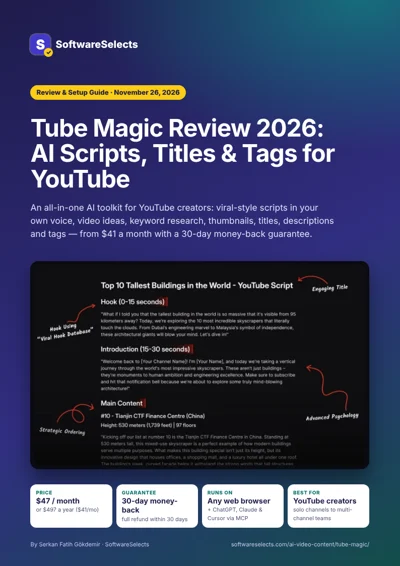
Free PDF
Download the Tube Magic review & setup guide
Everything on this page in a colourful, printable PDF: our verdict, features, pricing, the full setup guide with MCP steps and a checklist you can tick off.
- Verdict & pricing
- 7-step setup guide
- MCP setup for ChatGPT & Claude
- Printable checklist
About this review
Who wrote it

Serkan Fatih Gökdemir
Founder and Editor, SoftwareSelects
Serkan builds websites, WordPress plugins and online calculator tools himself, so he looks at software the way a working user would. He has also worked for 15 years as a medical laboratory technician, with an education in chemistry, and brings the same habit of checking details carefully to every page: what a product actually does, what it costs, what the refund terms are and who it suits.
Sources: Tube Magic’s website (features, pricing and FAQ pages) and the Digistore24 product listing and checkout, checked on November 26, 2026. Creator names mentioned are featured on the seller’s website.
Questions about Tube Magic?
Tell our assistant about your channel and goals. It will tell you if Tube Magic fits — and what to try first.
Details are based on the seller’s website and the Digistore24 listing as of November 26, 2026 and can change — always confirm the price and refund terms at checkout. SoftwareSelects may earn a commission from purchases made through our assistant’s links, at no extra cost to you. Affiliate disclosure
