Remixable Review 2026: An All-in-One Marketing Suite, Tested Feature by Feature
A cloud-based suite for digital product sellers: a “remix” page builder with hosting and domains, a video and AI voice-over creator, logo and e-cover tools, 50 resell-rights software products and a no-code Software Generator — $475 one-time (or 2 or 6 payments), with a refund window of at least 60 days.
Our verdict
A lot of marketing tools in one place — test it with clear eyes
marketing suite
Remixable, on Digistore24 since 2022, packs the main tools a digital product seller needs into one browser-based account. Its page builder starts from ready-made blocks and copy: you describe your product, then click “remix” to cycle through headlines, colours, fonts and layouts, and publish on your own domain or a subdomain with hosting included. Around it sit a video creator (Rapid Render) with AI voice-overs and script templates, logo and e-cover makers, a push-notification list builder, 50 software products you may rebrand and resell, and a no-code Software Generator for simple searchable database tools. The value is real if you will use several of these tools; the sales page’s income stories are the seller’s own, not typical results. Our advice: buy it for the tools, not for a promise of money — and use the refund window of at least 60 days to test every feature you need, starting in week one.
What we like
- Many tools, one price. Page builder, hosting, domains, video, voice-overs, logos, e-covers and list-building in one account.
- Fast pages without design skills. Start from proven blocks and copy, then remix colours, fonts and headlines with one click.
- Resell-rights software included. 50 software products you may rebrand, bundle and sell as your own package.
- Build simple software without code. The Software Generator creates hosted, searchable database tools you can sell or give away.
- Video from a script. Paste a script, get an AI voice-over and slides with stock media in Rapid Render.
- One-time price, safe to test. No monthly fee and a refund window of at least 60 days through Digistore24.
Good to know
- Income claims are the seller’s. The sales page shares the founder’s results; they are not typical and no income is guaranteed.
- You still need traffic. Tools build pages and products; visitors and sales take marketing work — see the launch math tool.
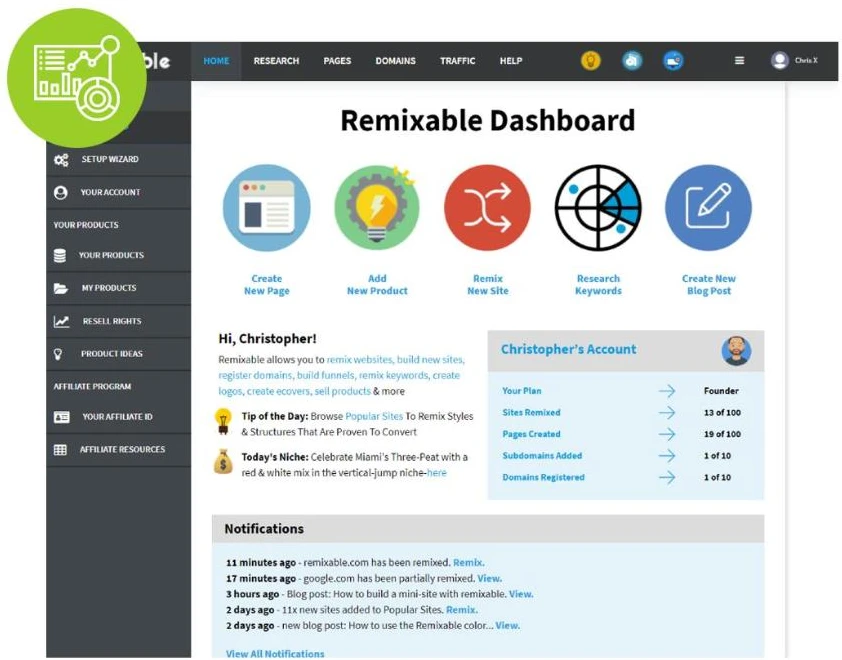
- Check the limits you need. “Unlimited” is promised, yet a dashboard screenshot shows usage counters (e.g. pages created 19 of 100) — ask support what applies to you.
- Older sales page, little public feedback. The page dates from 2022; one 2023 Trustpilot review reports slow support on a partnership offer — test support early.
What’s inside
Everything inside Remixable
Remixable describes 15+ features. Here they are grouped by what you will do with them. Screenshots are the seller’s images of the members area.
Build & publish
- Remix page builder500+ blocks; remix headlines, colours, fonts, icons
- 50 niche content packsHeadlines, copy and images pre-loaded
- Domains, subdomains & hostingFind a name and publish in minutes
- Funnels, nav bars & blogMenus in the Pages area
Create media
- Rapid Render video creatorSlides, transitions, 300+ stock media
- 1-Click VoiceAI voice-overs, US/UK/AU, male/female
- Script templatesVSL and affiliate review templates
- Logo & e-cover creatorBrand creatives for your products
Products & marketing
- 50 resell-rights toolsRebrand, bundle and sell as your own
- Software GeneratorNo-code, hosted, password-protected tools
- PushPro LitePush-notification list builder (up to 1,000 subscribers)
- Training & supportQuick-start, video training, live chat, tickets
How it works
From an idea to a published product page
Start on the dashboard
The dashboard links to everything: create a page, add a product, remix a site, research keywords or write a blog post. Your account panel shows your plan and usage.
Describe your product once
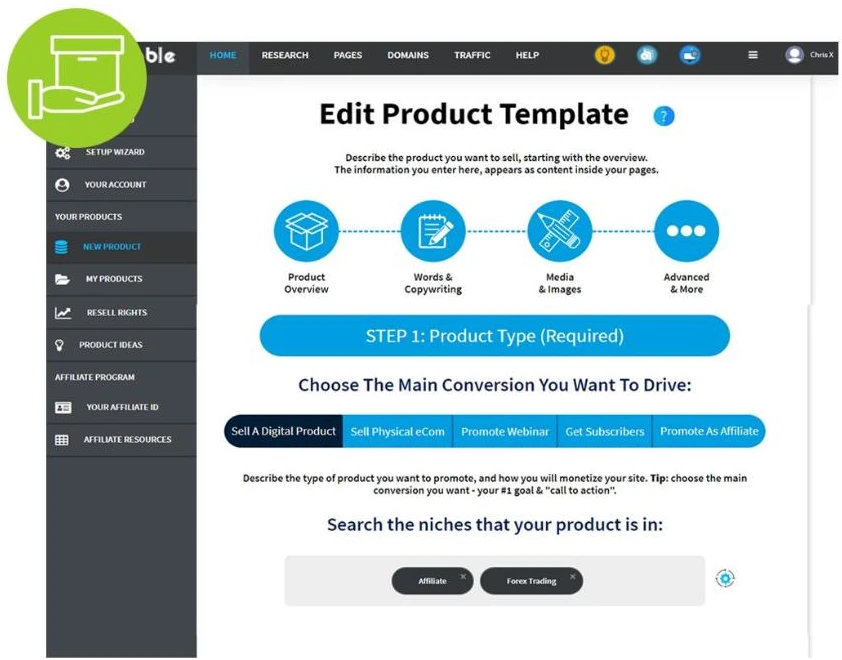
In “Edit Product Template” choose the conversion you want (sell a digital product, physical e-com, promote a webinar, get subscribers or promote as an affiliate), pick niches and add words and media. Everything you enter flows into your pages.
Build the page by remixing
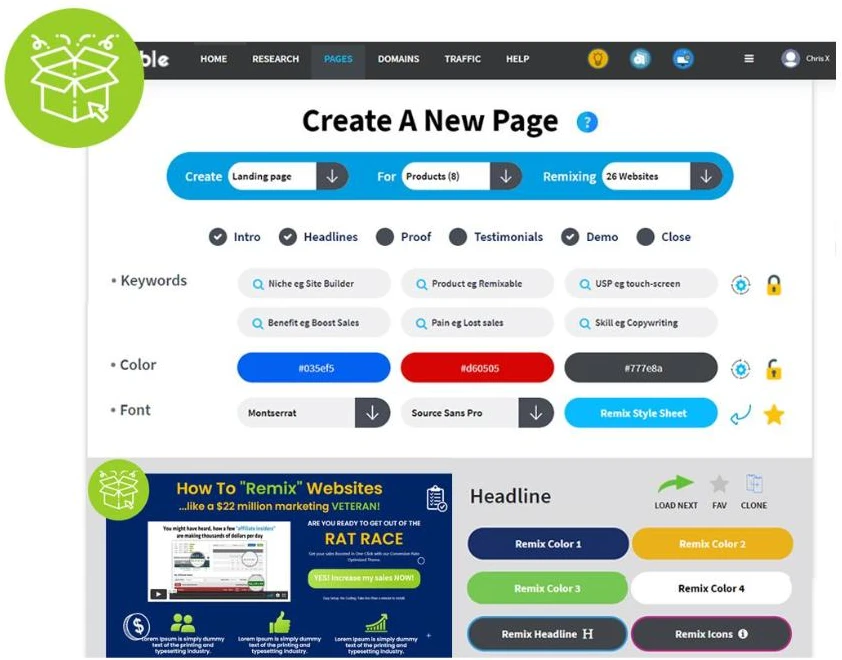
In “Create A New Page” choose the page type and sections, enter keywords, colours and fonts, then click “Remix” on each block to cycle through headlines, colours and icons until you like it.
Publish on your domain
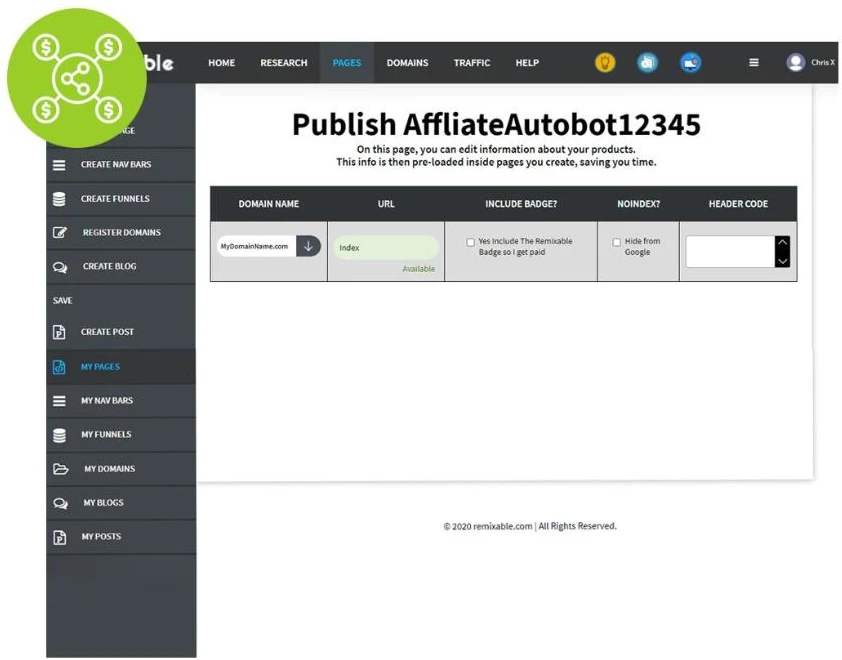
Pick a domain or subdomain and a URL, decide whether to show the Remixable badge or hide the page from Google, add header code if you need it and publish.
Add a video and a voice-over
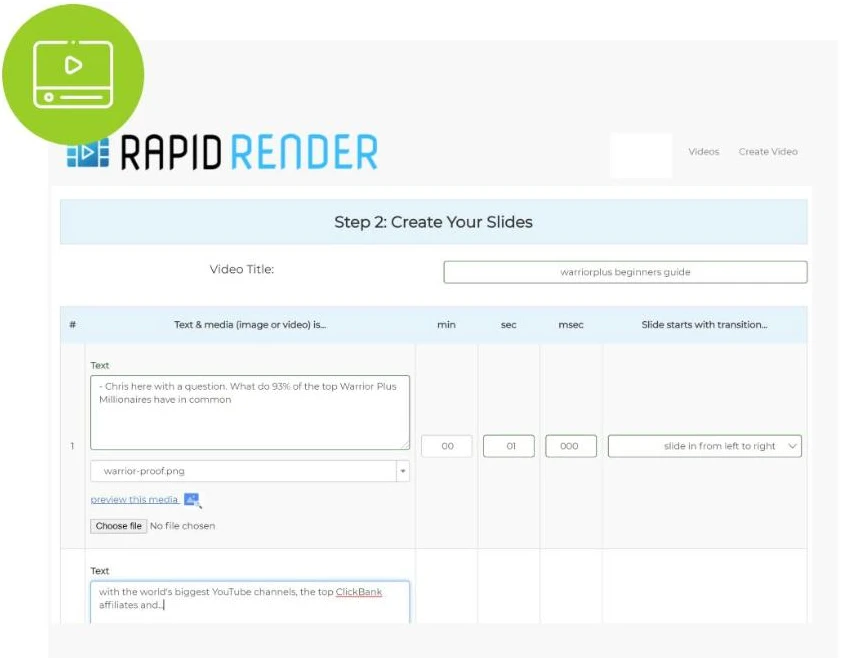
Paste a script into 1-Click Voice for an AI voice-over, then build slides in Rapid Render with timings, transitions and media, and export the video.
Create a simple software tool
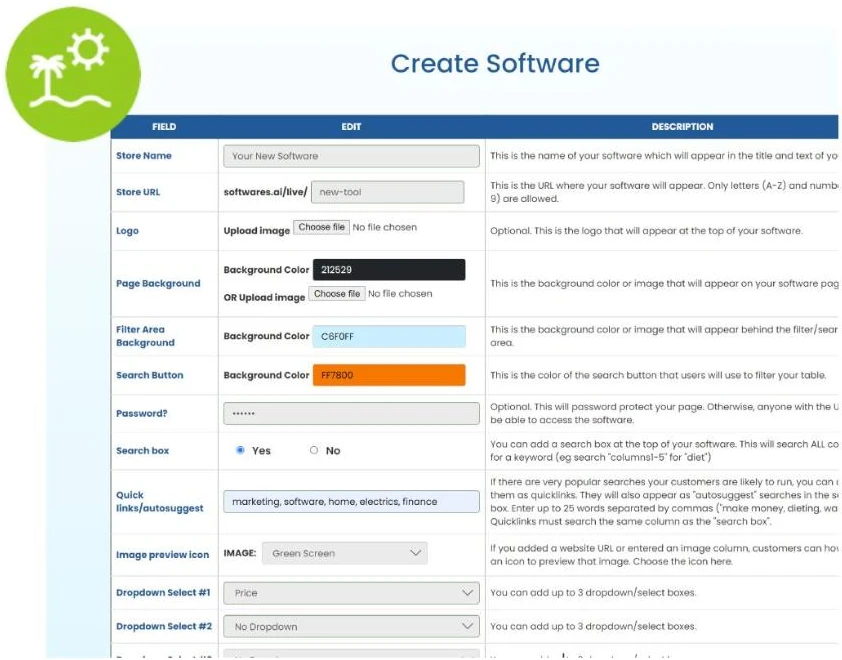
With the Software Generator, set a store name and URL, colours, an optional password, a search box and filters to publish a searchable database tool you can sell or give away.
Pricing
Founder Edition: pay once, or split it
Remixable Unlimited Founder Edition is sold through Digistore24 Inc. All plans give the same access; only the payment schedule differs. Prices from the order form.
One-time payment
$475 once
Saves $75–$107 compared with the split plans.
- All features and future updates (founder access)
- Hosting, domains and subdomain tools
- 50 resell-rights software tools
- Refund window of at least 60 days
2 payments
$275 × 2
$275 today and $275 a month later — $550 in total.
- Same access as one-time
- Second payment after 30 days
- Refund window of at least 60 days
6 payments
$97 × 6
$97 today, then 5 monthly payments — $582 in total.
- Same access as one-time
- Last payment about 5 months after purchase
- Refund window of at least 60 days
Taxes may be added at checkout where they apply. The sales page lists a “$297/mo” value for comparison; the actual price is the one-time Founder Edition shown above.
Setup guide
Setting up Remixable step by step
Plan two or three sessions in your first week. Everything runs in your browser — nothing to install.
Choose a payment plan and check out
Pick $475 once, 2 × $275 or 6 × $97 on the Digistore24 order form. Keep the order confirmation e-mail — it has your refund link and return period.
- Use the refund deadline tool above to put the date in your calendar.
Log in to the members area
Follow the access instructions after checkout and log in at the members area. Bookmark it.
Run the Setup Wizard
Open Setup Wizard and Your Account in the left menu. Check the quick-start page and the “?” help icons — they open short videos for each screen.
- Note the usage counters in your account panel, and ask support if anything you need is limited.
Create your product
Go to New Product → Edit Product Template. Choose the main conversion (sell a digital product, physical e-com, webinar, subscribers or affiliate), search your niches, then add words, copy and media.
- No product yet? Open Product Ideas and Resell Rights to package resell-rights tools into a bundle.
Build your first page
In Pages → Create A New Page choose the page type and sections (intro, headlines, proof, testimonials, demo, close), enter keywords, colours and fonts, then click Remix on each block until it looks right. Save.
💡 Change one thing at a time and preview on your phone — sales pages are mostly read on mobile.
Publish it
Under Domains find a domain or use a subdomain, then publish: choose the URL, whether to include the Remixable badge, whether to hide the page from Google (noindex) and any header code (for example analytics).
Add a video and creatives
Create a voice-over with 1-Click Voice, build slides in Rapid Render and export the video; make a logo and e-cover for your product.
- Use the video script tool above to plan length and slides.
Try the Software Generator — then decide
Build a small searchable tool in the Software Generator (store name, URL, colours, optional password, search box, filters). Then go through the 60-day test checklist and decide well before your refund deadline.
- Send support one real question in week one and note how fast they answer.
Three ways people use Remixable
Pick the path that matches your plan, so you test the right features first.
Sell your own product
- Describe it in Edit Product Template.
- Build and remix a sales page; publish on your domain.
- Add a demo video with Rapid Render.
You need a product and a traffic plan.
Resell-rights bundle
- Open Resell Rights and Product Ideas.
- Bundle a few tools, make a logo and e-cover.
- Build the sales page and test the checkout.
Check each tool’s licence terms.
Affiliate promotions
- Choose “Promote As Affiliate” as the conversion.
- Use review script templates and voice-overs.
- Publish a review page or video with your affiliate link.
Follow each program’s rules on claims.
Six things worth knowing
Test early
Use week one for the features you are buying it for.
Refund window
At least 60 days through Digistore24 Inc.
Limits
Check your dashboard counters and ask support.
Traffic
Pages don’t sell without visitors — plan this first.
Claims
Keep your own sales pages honest; avoid income promises.
Licences
Read the resell-rights terms before selling a bundle.
Your setup checklist
Free calculators
Six tools to decide, plan and test
Pick the payment plan, find your refund deadline, compare with separate tools, check the traffic a launch needs, plan video length and track your 60-day test.
1. Which payment plan?
Remixable is a one-time purchase, but you can split it. Compare the total cost and when each payment is due.
| Plan | Total | Extra vs. one-time | Last payment |
|---|
2. Your refund deadline
Digistore24 Inc. sales come with a return period of at least 60 days, and the seller offers refunds “for any reason”. Plan your testing so you decide in time.
3. What would separate tools cost you?
Remixable bundles a page builder, hosting, a video creator, AI voice-overs and logo/e-cover tools. Enter what you pay (or would pay) for separate tools each month to see how long until the one-time price evens out.
Enter your own prices — tools differ a lot in features, so compare only what you would really use.
4. Launch math: traffic you would need
Selling a product (for example a resell-rights software bundle) needs visitors. See how many sales a given amount of traffic could bring — an illustration, not a prediction.
Illustration only. Many new sales pages convert below 1%, and getting traffic is the hardest part. No income is guaranteed.
5. Video script length
Remixable turns a script into an AI voice-over and slides. Check how long your video will be and how many slides to plan.
6. Your 60-day test checklist
Test the features you are buying it for while you can still get a refund. Your ticks are saved in this browser.
Quick check
Is Remixable right for you?
Answer 5 quick questions.
Do you want to sell your own digital products or promote products as an affiliate?
Would you use at least three of: page builder, hosting, video, voice-overs, logos, resell-rights software?
Do you have (or will you build) a way to get visitors — email list, social media, ads or affiliates?
Can you spend a few hours in the first weeks testing the features?
Are you mainly hoping for fast, automatic income?
Also consider
Other tools from our Website & Marketing guide that suit different needs.

How to try it
Try Remixable safely in 4 steps
FAQ
Remixable questions answered
What is Remixable?
Remixable is a cloud-based suite for digital product sellers and affiliate marketers. It includes a remix-style page builder with hosting and domains, a video creator with AI voice-overs, logo and e-cover tools, 50 resell-rights software products, a Software Generator and training.
How much does Remixable cost?
$475 as a one-time payment, or 2 payments of $275 ($550) or 6 monthly payments of $97 ($582). All plans include the same Founder Edition access.
Is there a refund?
Yes. It is sold through Digistore24 Inc., whose sales have a return period of at least 60 days, and the seller’s terms say you may claim a refund for any reason. Check the exact period in your order e-mail.
Is Remixable a subscription?
No. The Founder Edition is a one-time purchase, optionally split into 2 or 6 payments; the seller says future features are included.
Will Remixable make me money?
Not by itself. It gives you tools to build products, pages and videos, but sales depend on your product, your traffic and your effort. The income stories on the sales page are the seller’s own results.
What are resell rights?
You may rebrand, bundle and sell the 50 included software tools as your own package and keep the revenue, according to the seller. Check the licence terms inside the members area for each tool.
What can the Software Generator build?
Simple hosted, optionally password-protected database tools with a search box, filters and quick links — for example a searchable directory. It is not for complex custom software.
Is it really unlimited?
The sales page promises unlimited sites and pages, but a dashboard screenshot shows usage counters (for example pages created 19 of 100, domains 1 of 10). Ask support what limits apply to your account before the refund deadline.
Do I need technical skills?
No coding is needed. You choose blocks and click “remix”; training videos and question-mark help icons explain each page. Some marketing knowledge helps a lot.
Who is behind Remixable?
The founder goes by “Chris X” and offers support by live chat, e-mail and tickets. The sales page dates from 2022 and public reviews are few, so test support in your first week.
Free PDF
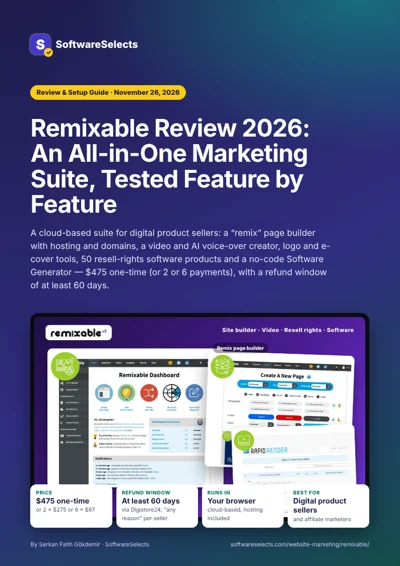
Download the Remixable review & setup guide
Everything on this page in a colourful, printable PDF: our detailed verdict, every feature explained, the three payment plans, the full setup guide, three ways to use it and the 60-day test checklist.
- Detailed verdict
- 8-step setup guide
- 3 ways to use it
- 60-day test checklist
About this review
Who wrote it

Serkan Fatih Gökdemir
Founder and Editor, SoftwareSelects
Serkan builds websites, WordPress plugins and online calculator tools himself, so he looks at software the way a working user would. He has also worked for 15 years as a medical laboratory technician, with an education in chemistry, and brings the same habit of checking details carefully to every page: what a product actually does, what it costs, what the refund terms are and who it suits.
Sources: the Remixable sales and order pages, its terms (refund policy), the Digistore24 order form and listing, Digistore24’s help article on return periods and the Trustpilot page for remixable.net, checked on November 26, 2026. Screenshots are the seller’s images of the members area.
Questions about Remixable?
Tell our assistant what you want to build and how you plan to get visitors. It will tell you honestly whether Remixable fits and which features to test first.
Details are based on the seller’s website and the Digistore24 listing as of November 26, 2026 and can change — always confirm the price and refund terms at checkout. SoftwareSelects may earn a commission from purchases made through our assistant’s links, at no extra cost to you. Affiliate disclosure
