Sniper Ashfield Pro Review 2026: EMA Crosses Scored by Six Checks
A 9/21 EMA crossover indicator for NinjaTrader 8, MetaTrader 4/5, TradingView and cTrader that scores every cross against trend, VWAP, RSI, MACD, ADX and volume, and draws the entry, an ATR stop and three targets — from €47 one-time with a 60-day money-back guarantee.
Our verdict
A disciplined way to trade the 9/21 EMA cross
NinjaTrader 8
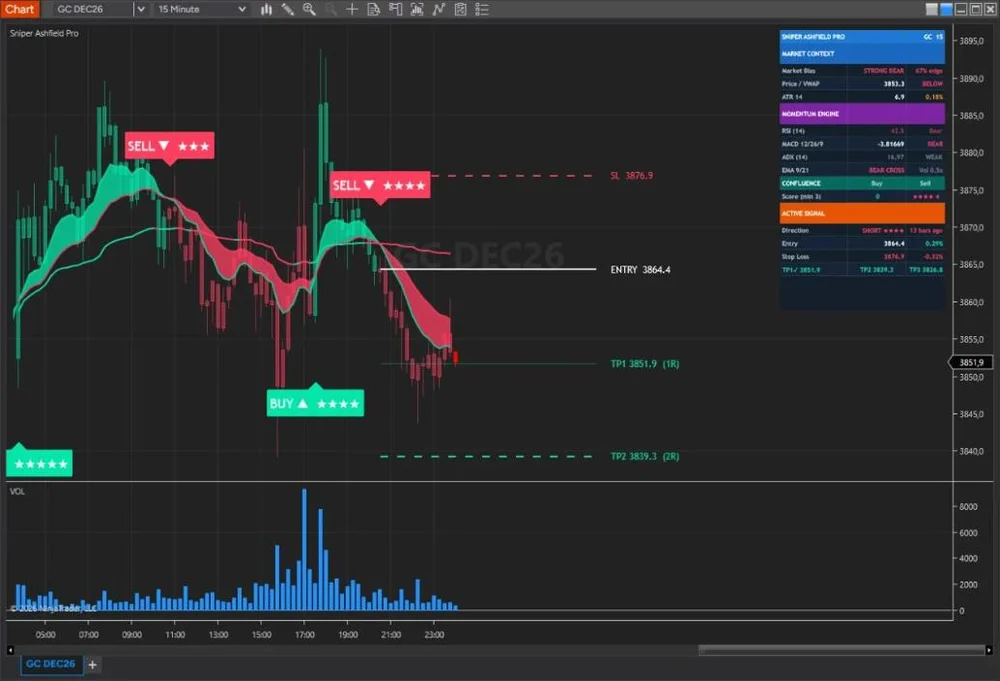
Sniper Ashfield Pro takes the simplest signal in trading — the 9/21 EMA cross — and adds the checking most traders do by eye across four extra panels. On the bar of each cross it scores six checks (EMA trend, session VWAP, RSI, MACD, ADX and a volume burst), prints a plate only when at least three agree, and draws the plan: entry at the close, a stop 1.5 ATRs away and targets at 1R, 2R and 3R. Like every AlgoFXStore product it is unusually honest: real unedited charts on 12 futures markets, every setting explained, no win-rate or income claims, and a 60-day money-back guarantee.
What we like
- Fewer, better-checked crosses. A plate prints only when at least 3 of 6 checks agree; stars show how many did.
- A plan with every plate. Entry at the close, an ATR stop that never moves and targets at 1R, 2R and 3R with price tags.
- No repainting by default. With Non-Repaint Mode on, a plate is decided when its bar closes and stays fixed.
- One dashboard instead of four panels. 19 rows read market bias, VWAP, RSI, MACD, ADX, volume and the active signal.
- Built for futures. Stops in ticks, session VWAP and alerts for every level hit on NinjaTrader 8.
- Honest and protected. Real charts, a 16-page manual, no profit claims and a 60-day money-back guarantee.
Good to know
- An indicator, not a robot. It signals, draws and alerts; you place and manage every order.
- A cross confirms, not predicts. EMA crosses come after a move has started — the score makes plates fewer, not earlier.
- Stars are not odds. Five stars means 5 or 6 checks agreed, not a higher chance of winning.
- NinjaTrader 8 Desktop only. The NT8 version needs NinjaTrader 8.1.x on Windows — not NinjaTrader Web or mobile.
What’s inside
A trigger, a score and a plan
Every part of Sniper Ashfield Pro is visible on the chart or the dashboard, so each signal is easy to check. The NinjaTrader 8 version has 21 setting groups and 13 alert events.
The trigger
- 9/21 EMA crossBUY only where the 9 crosses above the 21, SELL below
- EMA ribbon & candle tintTrend colour at a glance
- Session VWAP lineGreen above, red below
- Signal cooldownNo repeat signal on the same side within 5 bars
The score
- Six checksEMA trend, VWAP, RSI(14), MACD 12/26/9, ADX(14), volume
- Minimum scoreDefault 3 of 6; raise it for fewer plates
- Stars on every plateFive stars = 5 or 6 checks agreed
- Standing scoresWatch the BUY and SELL scores build before the cross
The plan & alerts
- Entry, ATR stop, 3 targetsStop 1.5 × ATR(14), targets 1R, 2R, 3R
- 19-row dashboardMarket bias, momentum, active signal, tally
- 13 alert eventsSignals and TP1–TP3 / SL hits, by sound or e-mail
- Plate stylesPlate, disc, plain text or LONG/SHORT arrows
How it works
From an EMA cross to a scored, planned trade
The cross is the trigger
A BUY can only happen on the bar where the 9 EMA crosses above the 21 EMA; a SELL only where it crosses below. With Non-Repaint Mode on, the cross is judged when its bar closes.
Six checks score the bar
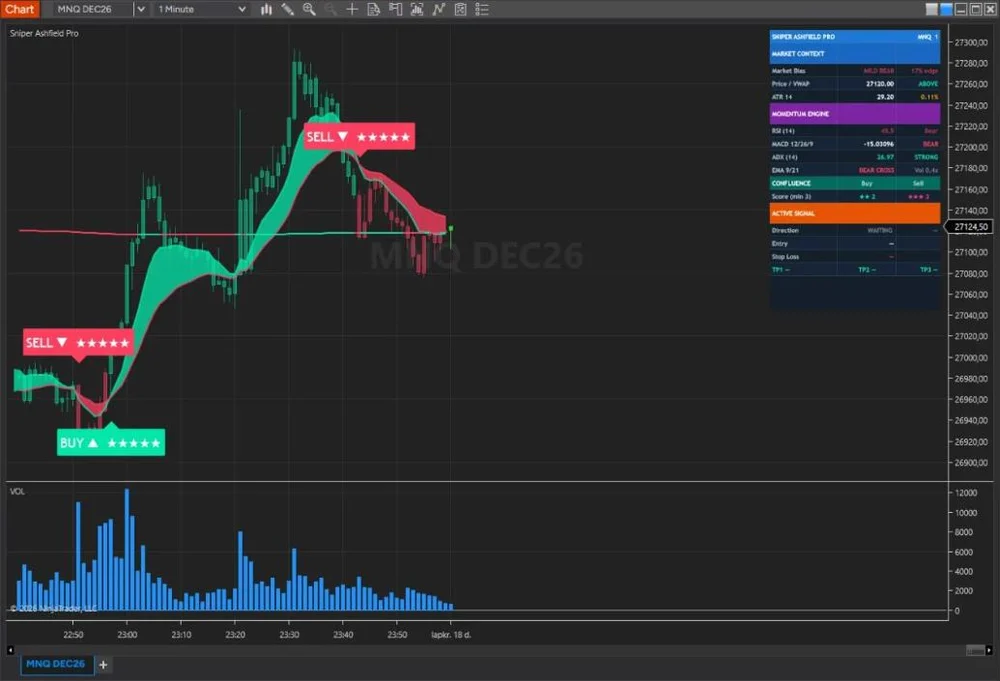
Each agreeing check adds a point: EMA trend, close vs session VWAP, RSI above/below 50, MACD vs its signal, ADX above 20 and a volume burst. A plate prints at the minimum score (3 by default) and shows the score as stars.
The plan is drawn for you
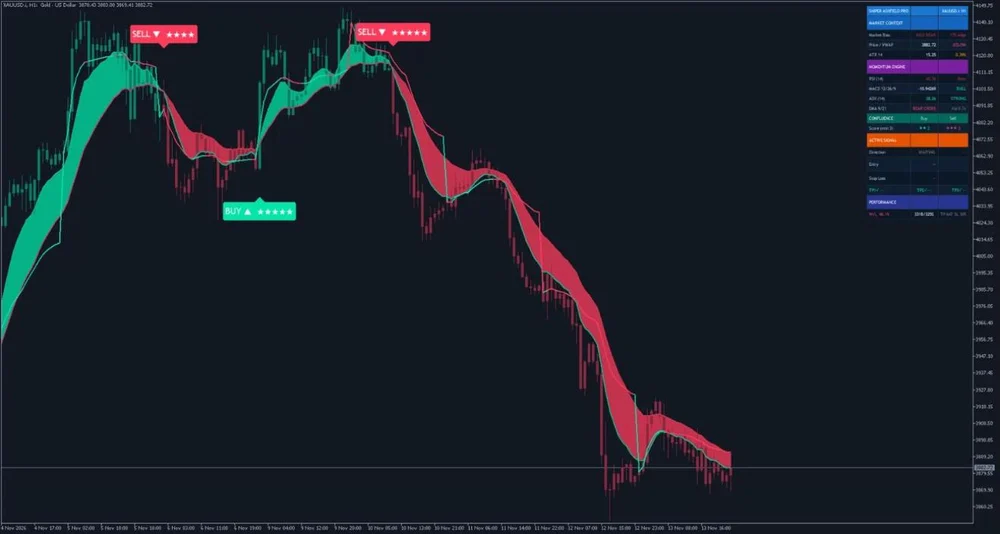
The close is the entry. The stop sits 1.5 × ATR(14) away and never moves; targets are at 1R, 2R and 3R. Reached targets turn solid and faded; TP3 or the stop ends the plan.
You size and place the order
Turn the stop into ticks and dollars, size your contracts from your own budget and place a bracket order — the calculator below does the maths.
Pricing
One payment per platform
Each platform version is a separate one-time purchase through Digistore24, with a PDF manual and a 60-day money-back guarantee. Prices in euros, from the seller’s pages.
NinjaTrader 8
€77 one-time
NinjaScript Add-On for NinjaTrader 8 Desktop.
- Shown on 12 futures markets (MNQ, ES, GC, CL…)
- 16-page PDF manual, 21 setting groups
- 13 alert events incl. TP and SL hits
- 60-day money-back guarantee
MetaTrader 4 + 5
€47 one-time
Both builds for forex, gold, indices, oil and crypto.
- Daily VWAP and tick-volume burst
- M15 to H4 charts
- Manual for each platform
- 60-day money-back guarantee
TradingView
€47 one-time
Full Pine Script source code.
- 13 alert conditions with entry, stop and targets
- TP1/TP2 lines turn solid when reached
- PDF guide
- 60-day money-back guarantee
cTrader
€47 one-time
One .algo indicator file.
- 19-row information panel
- Bar-close confirmation by default
- PDF manual
- 60-day money-back guarantee
VAT is added at checkout where it applies. Sniper Ashfield Pro is an indicator, not an automated trading system or financial advice.
Setup guide
Installing Sniper Ashfield Pro on NinjaTrader 8
These steps are for NinjaTrader 8 Desktop; MetaTrader, TradingView and cTrader are below. Installation takes a few minutes — then practise in simulation before trading live.
Pick your platform and check out
Each platform is a separate product: NinjaTrader 8 (€77), MetaTrader 4 + 5, TradingView or cTrader (€47 each). Checkout and delivery are handled by Digistore24.
- After paying you land on your download page; the link is also in your Digistore24 order e-mail — keep it for the 60-day refund window.
- Check you run NinjaTrader 8 Desktop 8.1.x on Windows — NinjaTrader Web and mobile are not supported.
💡 Not sure? Choose the platform where your charts and broker account already are.
Download the zip — keep it zipped
Download SniperAshfieldProAlgoFX.zip (0.2 MB). Do not unzip it: NinjaTrader imports the zip file itself.
Import it into NinjaTrader 8
In the NinjaTrader Control Center open Tools → Import → NinjaScript Add-On, select the zip and confirm.
- NinjaTrader compiles it and confirms the import.
- It then appears as “Sniper Ashfield Pro AlgoFX” in your Indicators list.
Set up the chart
Open a chart of your contract and load at least 500 bars so the averages settle: about 3 days on 1 minute, 5 days on 5 minute, 15 days on 15 minute.
- Choose the Trading Hours template on purpose — RTH if you trade only the regular session, because it decides where the VWAP starts.
- After a contract roll, trade the front month and check the chart: one oversized bar can widen the ATR for a while.
Add the indicator
Right-click the chart → Indicators, add Sniper Ashfield Pro AlgoFX and click OK. Keep Calculate on On bar close and Non-Repaint Mode on.
- Start with the defaults — they are the settings on all the seller’s charts.
- Raise Minimum Confluence Score (1–6) or Signal Cooldown for fewer plates.
- Switching a Require check off gives its point for free — more plates, not fewer.
Read the plate and the dashboard
When a plate prints, read its stars and the dashboard: Price/VWAP on the signal’s side and ADX STRONG mean more of the market agrees. Hover a plate to see the exact score out of 6 and all five levels.
- Skip a signal after one big bar has already covered most of the way to TP1, and signals inside scheduled news.
Size the trade in ticks
Divide the distance from ENTRY to SL by the tick size, multiply by the tick value for the risk per contract, and size from your own budget — or use the calculator above.
- Round the stop to the next valid tick away from the entry and the targets to the nearest tick.
- Place a bracket order so the levels are handled when touched — alerts arrive only at bar close.
Set alerts and practise in simulation
Choose which of the 13 alert events you want (signals, TP1–TP3 and SL hits) — in the Alerts Log, by sound or by e-mail. Then trade it in NinjaTrader’s simulation account for a few weeks.
- Decide in advance what you do at TP1 and TP2: take part off and move the stop, or hold for TP3.
- If it is not for you, request your refund within 60 days.
Other platforms: MetaTrader 4/5, TradingView and cTrader
The same six-check logic on every platform — only the installation differs. Each version comes with its own PDF guide.
MetaTrader 4 + 5
- In MetaTrader open File → Open Data Folder.
- Copy the
.ex4intoMQL4/Indicatorsor the.ex5intoMQL5/Indicators. - Refresh the Navigator and drag Sniper Ashfield Pro onto a chart.
Both builds come in one €47 download. Uses the day’s VWAP and tick volume.
TradingView
- Open the downloaded Pine Script code file and copy all of it.
- In TradingView open the Pine Editor, paste and click Save.
- Click Add to chart, then set up alerts from its 13 alert conditions.
Full Pine Script source code and a PDF guide.
cTrader
- Unzip the download and double-click the
.algofile — cTrader Desktop installs it. - Or import the file in cTrader Automate.
- Open Indicators → Custom on a chart and add Sniper Ashfield Pro.
One .algo file and a PDF manual.
Six settings worth knowing
Minimum Confluence Score
Default 3 of 6; raise it to 4 or 5 for fewer, better-checked plates.
Signal Cooldown
Default 5 bars; a longer cooldown avoids repeat signals in chop.
Non-Repaint Mode
Keep it on so plates are decided on the closed bar.
ATR stop multiplier
1.5 × ATR(14) by default; the risk unit is never under ten ticks.
Require switches
Turning a check off gives its point free — more plates, not fewer.
Plate style
Plate, disc, plain text or LONG/SHORT arrows.
Your setup checklist
Free calculators
Plan your futures trades the Sniper Ashfield way
Turn the ATR stop into ticks, dollars and contracts, and check whether a cross would print a plate.
Futures stop & contract calculator
Sniper Ashfield Pro puts the stop 1.5 × ATR(14) from the entry and targets at 1R, 2R and 3R. Turn that into ticks, dollars and contracts for your futures contract.
| Target | Distance | Per contract |
|---|
Tick sizes and values are the standard CME specifications; check your broker. The indicator never uses a risk unit smaller than ten ticks. Not financial advice.
Confluence check: would this cross print?
On the bar of a 9/21 EMA cross, each check that agrees adds one point. Tick what you see on the chart.
Stars show how much agreed on the cross bar — not how likely the trade is to work.
Quick check
Is Sniper Ashfield Pro right for you?
Answer 5 quick questions.
Do you trade (or want to trade) EMA crosses?
Do you use NinjaTrader 8 Desktop, MetaTrader, TradingView or cTrader?
Would you like each cross checked against VWAP, momentum and volume?
Are you comfortable sizing and placing orders yourself?
Do you want an automated system that trades for you?
Also consider
Other tools from our Trading Software guide that suit different needs.
How to try it
Try Sniper Ashfield Pro risk-free in 4 steps
FAQ
Sniper Ashfield Pro questions answered
What is Sniper Ashfield Pro?
Sniper Ashfield Pro is an EMA crossover indicator by Kestutis Balciunas (AlgoFXStore). It scores every 9/21 EMA cross against six checks and draws an entry, an ATR stop and three targets when enough of them agree.
Does Sniper Ashfield Pro repaint?
With Non-Repaint Mode on (the default), a plate is decided when its bar closes and stays fixed, according to the seller.
How much does it cost?
The NinjaTrader 8 version costs €77; the MetaTrader 4 + 5, TradingView and cTrader versions cost €47 each — all one-time payments with a 60-day money-back guarantee.
What do the stars mean?
They show how many of the six checks agreed on the cross bar; five stars means 5 or 6. They are not a probability of winning.
Which markets does it suit?
On NinjaTrader 8 the seller shows it on index, metal, energy, currency and bond futures such as MNQ, ES, GC, CL, 6E and ZB on minute charts. The MetaTrader version is for forex, gold, indices, oil and crypto from M15 to H4.
Will it trade for me?
No. It signals, draws and alerts; you place and manage every order.
Does it work on NinjaTrader Web or mobile?
No. The NinjaTrader version needs NinjaTrader 8 Desktop for Windows, version 8.1.x.
Is it useful for prop firm challenges?
Its fixed ATR stops and tick-based levels make risk easy to plan, which helps with strict daily-loss rules — but no indicator guarantees passing a challenge.
How do I install it on NinjaTrader 8?
In the Control Center choose Tools → Import → NinjaScript Add-On, select the zip (keep it zipped), then add “Sniper Ashfield Pro AlgoFX” from the Indicators list on a chart.
Can I get a refund?
Yes. You have 60 days to request a full refund through the link in your Digistore24 order e-mail.
Free PDF
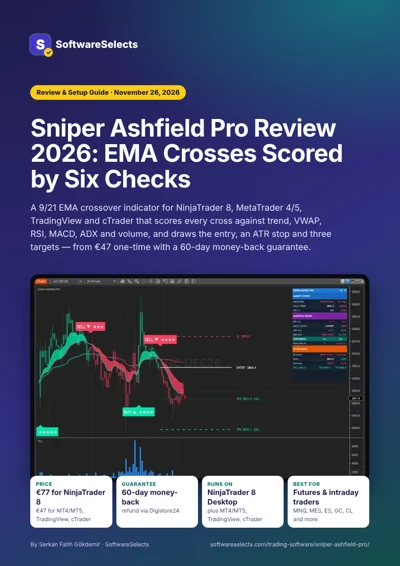
Download the Sniper Ashfield Pro review & setup guide
Everything on this page in a colourful, printable PDF: our verdict, how the six checks and the plan work, prices for every platform, the full NinjaTrader 8 installation guide plus MetaTrader, TradingView and cTrader, and a checklist.
- Verdict & how it works
- 8-step NinjaTrader setup
- MT4/MT5, TradingView & cTrader
- Printable checklist
About this review
Who wrote it

Serkan Fatih Gökdemir
Founder and Editor, SoftwareSelects
Serkan builds websites, WordPress plugins and online calculator tools himself, so he looks at software the way a working user would. He has also worked for 15 years as a medical laboratory technician, with an education in chemistry, and brings the same habit of checking details carefully to every page: what a product actually does, what it costs, what the refund terms are and who it suits.
Sources: the AlgoFXStore product pages for NinjaTrader 8, MetaTrader 4/5, TradingView and cTrader, and the Digistore24 product listings, checked on November 26, 2026. Chart images are the seller’s unedited NinjaTrader 8 and MetaTrader captures.
Questions about Sniper Ashfield Pro?
Tell our assistant your platform, contracts and timeframes. It will tell you which version fits and how to set it up.
Details are based on the seller’s website and the Digistore24 listing as of November 26, 2026 and can change — always confirm the price and refund terms at checkout. SoftwareSelects may earn a commission from purchases made through our assistant’s links, at no extra cost to you. Affiliate disclosure
