Kumo Forge Pro Review 2026: An Adaptive Ichimoku That Scores Every Setup
An Ichimoku indicator for MetaTrader 4/5, TradingView, NinjaTrader 8 and cTrader that adapts to volatility, scores every setup out of 100 and draws the entry, stop and three targets — from €47 one-time with a 60-day money-back guarantee.
Our verdict
The most transparent Ichimoku tool we have seen
MetaTrader
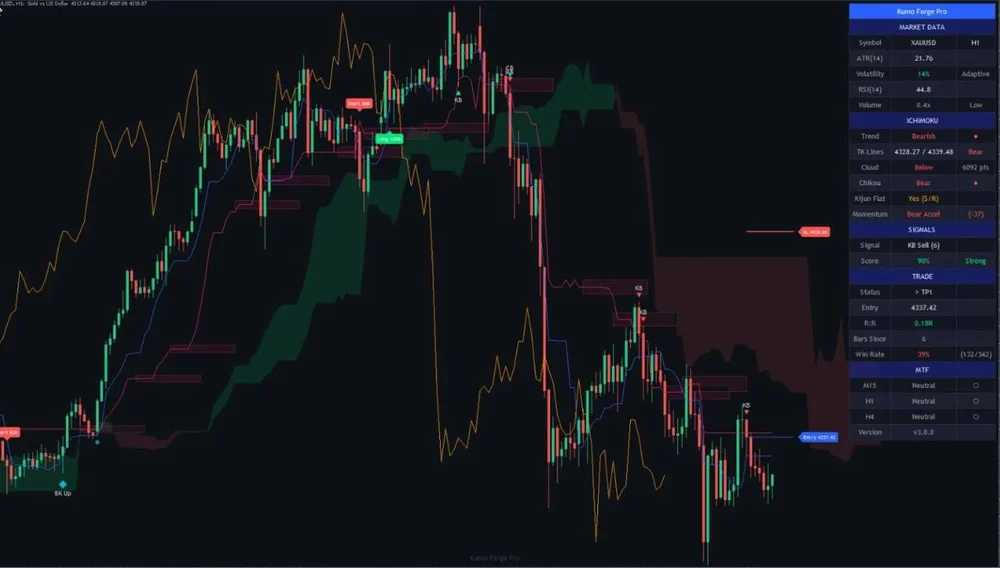
Kumo Forge Pro keeps the classic Ichimoku and adds three things traders usually work out by eye: periods that adapt to volatility, a 0–100 confluence score for every setup and a complete trade plan — entry, stop and three targets — drawn the moment a signal prints on a closed bar. What sets it apart is honesty: the seller shows 26 unedited MetaTrader charts at default settings, publishes how often it signals, explains all 72 inputs, makes no profit or win-rate claims and backs it with a 60-day money-back guarantee. Both MT4 and MT5 builds come in one €47 download.
What we like
- No repainting. Signals are decided on closed bars — once a plate prints, it stays where it is.
- Every setup scored. Eight factors (RSI optional as a ninth) give a score out of 100, so strong and weak crosses no longer look alike.
- A plan with every signal. Entry, stop at the cloud edge, Kijun or 2 ATR, and targets at 1.5R, 2.5R and 4R.
- Five signal types. TK cross, Kijun bounce, cloud-edge bounce, Kumo breakout and retest from one rule set.
- Honest documentation. 26 real charts, signal-frequency tables, 27-page manuals and no income claims.
- Low one-time price. €47 for MT4 and MT5 together, free updates to the current version, 60-day refund window.
Good to know
- An indicator, not a robot. It scores, draws and alerts; you decide and place every trade yourself.
- The % is not a probability. “Long 74%” means 74 points of agreement out of 100, not a 74% chance of winning.
- Stops follow the cloud. Stops sit at the cloud edge, the Kijun or two ATRs — not at swing highs and lows.
- One platform per purchase. MT4/MT5, TradingView, cTrader and NinjaTrader 8 are separate products.
What’s inside
An adaptive cloud, a score and a plan
Kumo Forge Pro is built in three layers you can see on the chart. The MetaTrader version has 72 inputs and 22 alert events, all explained in the manual.
Adaptive Ichimoku
- Adaptive periodsTenkan 5–13, Kijun 16–36, Span B 31–73 with volatility
- Classic modeFixed 9, 26 and 52 if you prefer
- Support & resistance boxesDrawn where a flat Kijun ends
- Multi-timeframe panelTrend on M15, H1 and H4 from closed bars
Scored signals
- Confluence score 0–100Cloud, TK lines, Chikou, cloud direction and thickness, volume, momentum
- Five signal typesTK cross, Kijun bounce, cloud-edge bounce, breakout, retest
- Min Confluence ScoreDefault 40; raise towards 80 for fewer, stronger setups
- FiltersKumo thickness, volume and Chikou confirmation
Plan & alerts
- Entry, stop, 3 targets1.5R, 2.5R and 4R by default, all adjustable
- 28-row dashboardMarket data, Ichimoku state, score, open trade
- 22 alert eventsPopup, sound, push to the MT app or e-mail
- Webhook JSONAlerts as JSON for tools that read it
How it works
From a cloud to a scored, planned setup
The cloud adapts
The indicator places the current ATR(14) within its range over the last 50 bars. In fast markets the periods shorten, in quiet markets they lengthen — so the cloud reacts to the market you are actually trading.
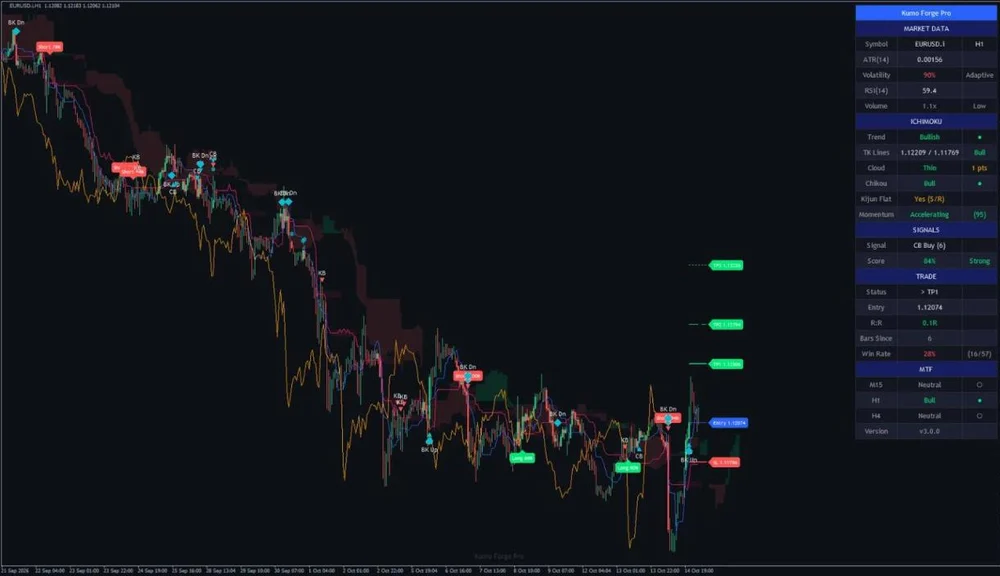
Every setup gets a score
Eight factors add up to a score out of 100: price against the cloud, Tenkan against Kijun, the Chikou, cloud direction and thickness, volume, momentum and its acceleration. 80+ is Strong, 50+ Standard.
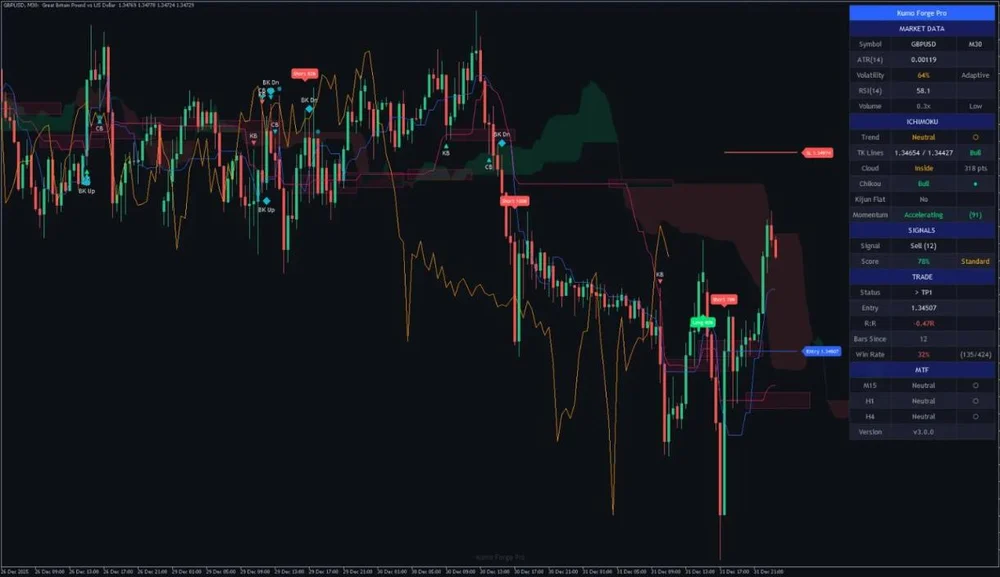
The plan is drawn for you
The signal bar’s close is the entry. The stop goes beyond the cloud edge plus 0.5 ATR (or the Kijun, or two ATRs) and three targets sit at 1.5, 2.5 and 4 times that risk, with price tags on the chart.
You decide
The dashboard tracks the plan and alerts you when targets or the stop are reached. You choose the position size and place the order — the calculators below help with that.
Pricing
One payment per platform
Each platform version is a separate one-time purchase through Digistore24, with free updates to the current version. Prices in euros, from the seller’s pages.
MetaTrader 4 + 5
€47 one-time
The .ex4 and .ex5 in one download.
- Two 27-page PDF manuals
- 72 inputs, 22 alert events
- Dashboard with 28 rows
- 60-day money-back guarantee
TradingView
€47 one-time
Full Pine Script source code.
- Paste into the Pine Editor and add to chart
- 5-page PDF guide
- Up to nine scoring factors, six signal marks
- 60-day money-back guarantee
cTrader
€47 one-time
One .algo indicator file.
- Double-click to install in cTrader Desktop
- 11-page PDF manual, 75 settings
- Optional Chikou breakout signal
- 60-day money-back guarantee
NinjaTrader 8
€77 one-time
NinjaScript Add-On for futures traders.
- Stops counted in ticks for MNQ, MES, MGC, MCL
- 15-page PDF manual
- Dashboard reads 15, 60 and 240 minutes
- 60-day money-back guarantee
VAT is added at checkout where it applies. Kumo Forge Pro is an indicator, not an automated trading system or financial advice.
Setup guide
Installing Kumo Forge Pro and setting it up
These steps are for MetaTrader 4 and 5; TradingView, NinjaTrader 8 and cTrader are below. Installation takes about five minutes — then practise on a demo account before you trade real money.
Pick your platform and check out
Each platform is a separate product: MetaTrader 4 + 5 (€47), TradingView (€47), cTrader (€47) or NinjaTrader 8 (€77). Checkout and delivery are handled by Digistore24.
- Right after paying you land on your download page; the link is also in your Digistore24 order e-mail — keep it for the 60-day refund window.
💡 Not sure? Choose the platform where you already have your charts and broker account.
Download and unzip
Download the zip and unzip it. The MetaTrader version contains Kumo_Forge_Pro.ex4, Kumo_Forge_Pro.ex5 and a 27-page PDF manual for each platform.
Copy the file into MetaTrader
In MetaTrader open File → Open Data Folder. Copy the .ex4 into MQL4/Indicators (MetaTrader 4) or the .ex5 into MQL5/Indicators (MetaTrader 5).
- Back in MetaTrader, right-click Indicators in the Navigator and choose Refresh (or restart the terminal).
Attach it to a chart
Drag Kumo Forge Pro from the Navigator onto a chart and click OK. Start with the default inputs — they are the settings used on all the seller’s charts.
- Make sure the chart has enough history loaded; it calculates the last 20,000 bars by default.
- The dashboard appears in the corner of your choice (top right by default).
Choose how selective it is
Open the inputs and look at Min Confluence Score (default 40). Raise it towards 80 if you only want the setups with most factors behind them.
- Turn signal types on or off under Signal Types.
- Switch Calculation Mode between Adaptive and Classic (fixed 9, 26, 52).
- Choose where the stop goes under SL Mode: Kumo Edge, Kijun or ATR.
Read the dashboard and the plan
Each signal shows its score and draws the entry, stop and three targets with price tags. The dashboard tracks the trade and shows the trend on M15, H1 and H4.
- Remember: “Long 74%” is a score, not a probability.
- Use the position-size calculator above to size each trade before you place it.
Set up alerts
Pop-up alerts are on by default. For alerts on your phone, enable Push notification in the inputs and enter your MetaQuotes ID under Tools → Options → Notifications.
- For e-mail alerts, set up Tools → Options → Email and switch on E-mail in the inputs.
- Alerts fire once per event on closed bars only.
Practise on a demo account first
Run it on a demo account for a few weeks. Note which signal types and scores suit your markets and timeframes before you risk real money.
- Most traders risk 0.5–2% of their account per trade.
- If it is not for you, request your refund within 60 days.
Other platforms: TradingView, NinjaTrader 8 and cTrader
The same idea on every platform — only the installation differs. Each version comes with its own PDF guide.
TradingView
- Open the downloaded
Kumo_Forge_Pro_TradingView_Code.txtand copy all of it. - In TradingView open the Pine Editor, paste the code and click Save.
- Click Add to chart — it appears as “Kumo Forge Pro [AlgoFXStore]”.
You get the full Pine Script source code and a 5-page PDF guide.
NinjaTrader 8
- In the Control Center open Tools → Import → NinjaScript Add-On.
- Select
KumoForgeProAlgoFX.zipand confirm the import. - Open a chart, go to Indicators and add “Kumo Forge Pro AlgoFX”.
Built for 5–15 minute futures charts such as MNQ, MES, MGC and MCL. 15-page manual.
cTrader
- Unzip the download and double-click
Kumo Forge Pro AlgoFX.algo— cTrader Desktop opens and installs it. - Or import the file in cTrader Automate.
- Open a chart, open Indicators → Custom and add “Kumo Forge Pro AlgoFX”.
One .algo file and an 11-page manual with 75 settings.
Six settings worth knowing
Min Confluence Score
Default 40 shows every setup worth a look; 80 shows Strong setups only.
Calculation Mode
Adaptive follows volatility; Classic keeps 9, 26 and 52.
SL Mode
Kumo Edge, Kijun or ATR — choose where your stop goes.
TP1 / TP2 / TP3 R:R
Targets at 1.5, 2.5 and 4 times the risk by default.
Kumo Thickness Filter
Skips TK crosses and Kijun bounces while the cloud is thin.
Show MTF Panel
Trend rows for M15, H1 and H4, plus an alignment alert.
Your setup checklist
Free calculators
Plan your trades the Kumo Forge Pro way
Work out target prices and position size from a signal, see how the adaptive periods change with volatility, and estimate how many signals you will get.
Trade plan & position size
Kumo Forge Pro draws the entry, the stop and three targets at 1.5R, 2.5R and 4R. Enter them here to see the target prices and the position size for the risk you choose.
| Target | Price | If reached |
|---|
Standard lots: 100,000 units for forex, 100 oz for gold. Pip values assume a USD account and USD-quoted pairs; check your broker’s contract specs. Not financial advice.
Adaptive Ichimoku explorer
In Adaptive mode, Kumo Forge Pro shortens the Ichimoku periods by up to 40% when the market is volatile and lengthens them by up to 40% when it is quiet. Move the slider to see the periods it uses.
How many signals will I see?
Based on the seller’s counts on 16 MetaTrader 5 charts (median per 1,000 bars; forex week of about 120 trading hours). Fewer signals does not mean better signals.
Quick check
Is Kumo Forge Pro right for you?
Answer 5 quick questions.
Do you trade (or want to trade) with the Ichimoku cloud?
Do you use MetaTrader, TradingView, NinjaTrader 8 or cTrader?
Would you like each setup scored, with entry, stop and targets drawn?
Are you comfortable placing trades and managing risk yourself?
Are you looking for a robot that trades automatically?
Also consider
Other tools from our Trading Software guide that suit different needs.

How to try it
Try Kumo Forge Pro risk-free in 4 steps
FAQ
Kumo Forge Pro questions answered
What is Kumo Forge Pro?
Kumo Forge Pro is an Ichimoku indicator by Kestutis Balciunas (AlgoFXStore). It adapts the Ichimoku periods to volatility, scores every setup out of 100 and draws an entry, a stop and three targets for each signal.
Does Kumo Forge Pro repaint?
No. Signals are decided on closed bars; once a plate or marker prints, it stays where it is, according to the seller.
How much does it cost?
MetaTrader 4 + 5, TradingView and cTrader versions cost €47 each, the NinjaTrader 8 version €77 — all one-time payments with a 60-day money-back guarantee.
What does “Long 74%” mean?
It is the confluence score: 74 points of agreement out of 100. It is not a probability that the trade will win.
Will it trade for me?
No. It is an indicator: it scores setups, draws the plan and sends alerts. You choose the position size and place the orders.
Which markets and timeframes does it suit?
The seller shows it on forex, gold, stock indices and crypto, mainly from M15 to H4 on MetaTrader and 5–15 minute charts for futures on NinjaTrader 8.
Do I get MT4 and MT5?
Yes. One €47 purchase includes both the .ex4 for MetaTrader 4 and the .ex5 for MetaTrader 5, with a manual for each.
Does the seller publish a win rate?
No. The seller deliberately does not quote win rates or profits. The dashboard’s Win Rate row only describes what the drawing did on the loaded history, without spread or commission.
How do I get it after paying?
After checkout you land on your Digistore24 download page; the link is also in your Digistore24 order e-mail.
Can I get a refund?
Yes. You have 60 days to request a full refund through the link in your Digistore24 order e-mail.
Free PDF
Download the Kumo Forge Pro review & setup guide
Everything on this page in a colourful, printable PDF: our verdict, how the score and plan work, prices for every platform, the full installation guide for MetaTrader, TradingView, NinjaTrader 8 and cTrader, and a checklist.
- Verdict & how it works
- 8-step MetaTrader setup
- TradingView, NT8 & cTrader
- Printable checklist
About this review
Who wrote it

Serkan Fatih Gökdemir
Founder and Editor, SoftwareSelects
Serkan builds websites, WordPress plugins and online calculator tools himself, so he looks at software the way a working user would. He has also worked for 15 years as a medical laboratory technician, with an education in chemistry, and brings the same habit of checking details carefully to every page: what a product actually does, what it costs, what the refund terms are and who it suits.
Sources: the AlgoFXStore product pages for MetaTrader 4/5, TradingView, NinjaTrader 8 and cTrader, and the Digistore24 product listings, checked on November 26, 2026. Chart images are the seller’s unedited MetaTrader captures.
Questions about Kumo Forge Pro?
Tell our assistant your platform, markets and timeframes. It will tell you which version fits and how to set it up.
Details are based on the seller’s website and the Digistore24 listing as of November 26, 2026 and can change — always confirm the price and refund terms at checkout. SoftwareSelects may earn a commission from purchases made through our assistant’s links, at no extra cost to you. Affiliate disclosure
