Annual Budget Planner 2026 Review: An Automated Excel Budget With Dashboards
A pre-built Excel budgeting system for 2026 with annual and monthly dashboards, a bill calendar, debt snowball, emergency and sinking funds, investment and home-affordability calculators and a net worth tracker — plus 7 extras, $47 one-time.
Our verdict
A complete money dashboard for people who like spreadsheets
budget planner
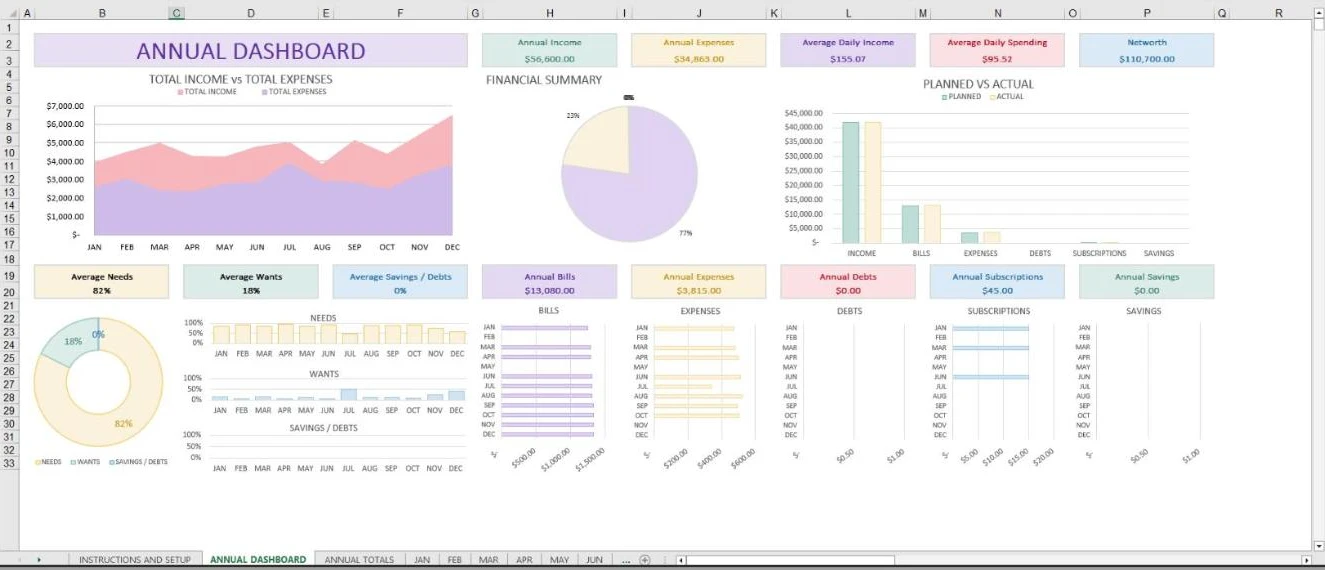
Annual Budget Planner 2026 is a ready-made Excel system: you type your planned and actual income, bills and expenses into each month, and the dashboards draw the picture — planned vs actual, needs vs wants, cash flow, bills on a calendar, and your yearly totals and net worth. Around that core sit the tools people usually build for themselves and never finish: a debt snowball, emergency and sinking funds, an investment projection and a home-affordability calculator. The seller shows real screenshots of the files, a pre-filled example workbook makes it easy to understand, and a separate Budget-by-Paycheck workbook suits people paid weekly or bi-weekly. For a one-time $47 — no subscription — it is a practical alternative to monthly budgeting apps.
What we like
- Everything in one workbook. Monthly budgets, annual totals, bills, savings, debt and net worth, all linked.
- Dashboards that update themselves. Enter numbers once; charts for planned vs actual and needs vs wants follow.
- Learn from a filled-in example. A pre-filled example version shows how every sheet looks with data.
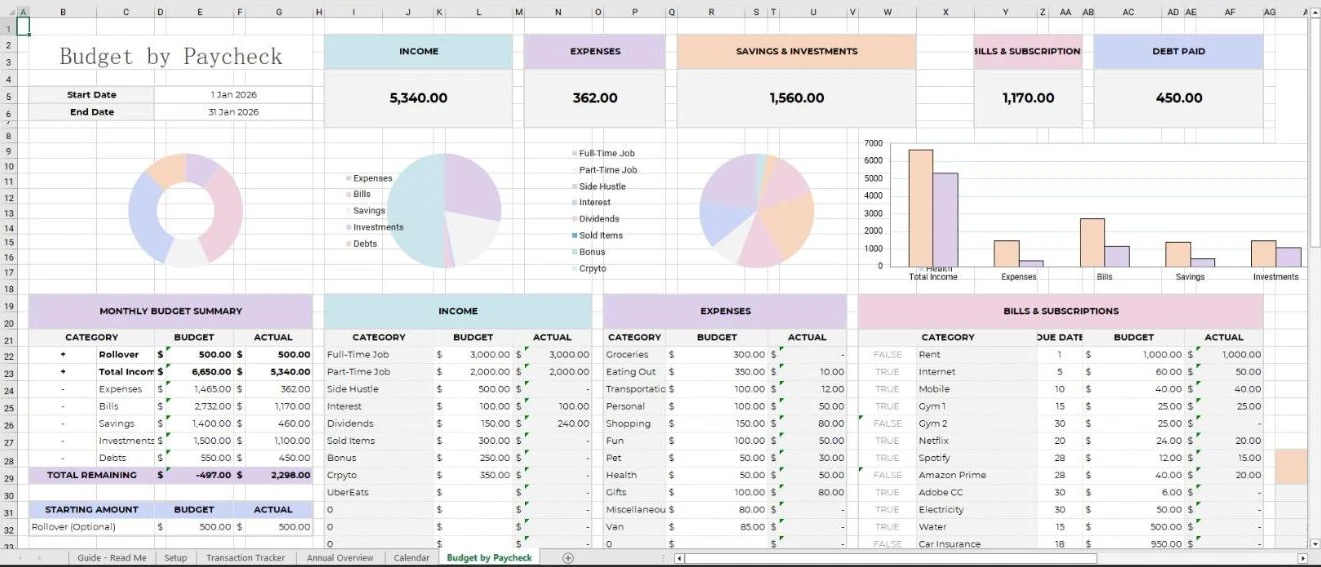
- Paycheck budgeting too. A separate Budget by Paycheck 2026 workbook for weekly or bi-weekly pay.
- No subscription, your data stays yours. Excel files on your own computer instead of a monthly app.
- Real screenshots, clear offer. The seller lists all 8 resources and shows the actual files.
Good to know
- You enter the numbers. It does not connect to your bank; you type or paste transactions yourself.
- Built for Excel. The main planner is an .xlsx workbook; other apps may show charts or formulas differently.
- Some extras are filler. The 25K+ ChatGPT prompt library and habit tracker are bonuses, not the reason to buy.
- Check the refund period. The order form does not show a guarantee badge; refunds follow the return period on your Digistore24 order.
What’s inside
One Excel system, eight resources
What you receive, as listed by the seller. The Annual Budget Planner 2026 workbook is the main product; the rest are included extras.
Budget & cash flow
- Annual dashboardIncome, expenses, planned vs actual, net worth
- 12 monthly dashboardsPlanned and actual income, bills, expenses, debts, savings
- Annual totalsAll months in one yearly summary
- Bill calendarRecurring income and bills on a dated calendar
Goals & calculators
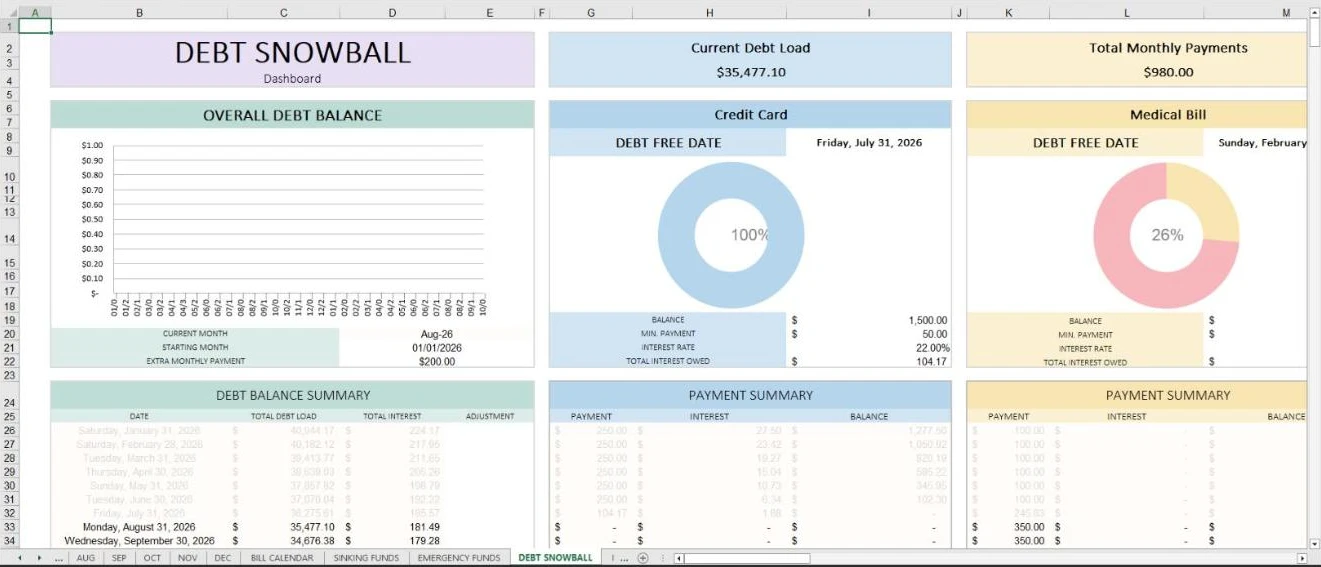
- Debt snowballBalances, interest, debt-free dates
- Emergency & sinking fundsTargets, monthly amounts, progress
- Investment calculatorContributions, horizon, projected balance
- Home affordability & net worthWhat you can afford; assets vs liabilities
Included extras
- Example version + Budget by PaycheckPre-filled workbook; paycheck-based budgeting
- Google Sheets trackersFinance tracker and habit tracker
- Financial Freedom e-book50/30/20 rule, debt, sinking funds, goals
- Video tutorial + promptsWalkthrough of the files; 25K+ ChatGPT prompts
How it works
From empty workbook to a clear money picture
Plan each month
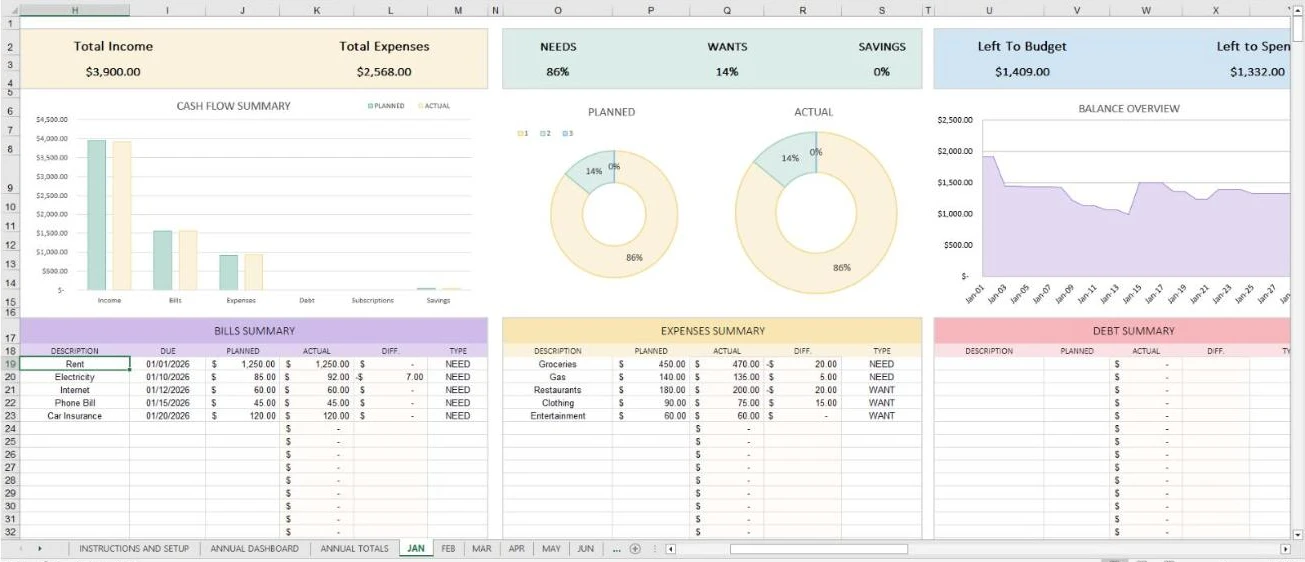
In each month’s sheet enter planned income, bills, expenses, debts and savings, then add the actual amounts as the month goes on. The month dashboard shows cash flow, left to budget and needs vs wants.
See your bills on a calendar
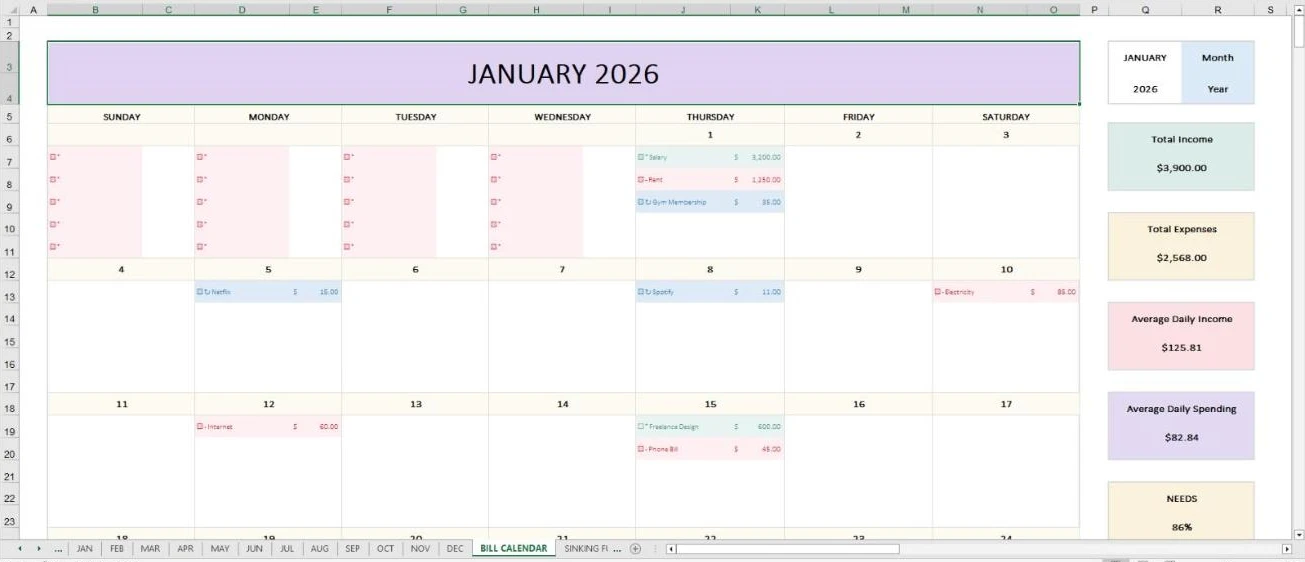
Recurring income and bills appear on a dated monthly calendar, with total income, expenses and daily averages beside it — so due dates never surprise you.
Pay off debt and build savings
The debt snowball dashboard tracks balances, minimum payments and interest and shows a debt-free date for each debt; emergency and sinking funds track your savings goals.
Budget by paycheck if you prefer
Paid weekly or bi-weekly? The separate Budget by Paycheck 2026 workbook plans each paycheck against income, expenses, bills, savings, investments and debt.
Pricing
One payment, no subscription
The complete bundle is a one-time purchase through Digistore24. Prices from the order form; VAT is included for EU buyers.
Annual Budget Planner 2026 bundle
$47 one-time
Digital download — no physical planner is shipped.
- Annual Budget Planner 2026 Excel system
- Example version + Budget by Paycheck 2026
- Google Sheets finance and habit trackers
- Financial Freedom e-book, video tutorial, 25K+ prompts
- No subscription or recurring fees
In the EU the order form shows €42.98 including VAT. Refunds are handled by Digistore24 according to the return period shown on your order form and in your order confirmation e-mail.
Setup guide
Setting up Annual Budget Planner 2026
Set aside about an hour for the first setup. After that, a few minutes a week keeps the dashboards up to date.
Buy and download the files
Check out through Digistore24 ($47 one-time). After payment, follow the delivery instructions to download the files, and keep the order confirmation e-mail.
- Save all files in one folder, for example “Budget 2026”, and back it up (cloud drive or USB stick).
- If the download is a ZIP file, right-click it → Extract All… before opening anything.
Watch the video tutorial first
The included video walks through the files. Ten minutes here saves a lot of guessing later.
Open the example version
Open Example Version Planner 2026 to see how every sheet looks with data — the annual dashboard, monthly sheets, bill calendar, debt snowball and funds.
- Keep the example as a reference; do your real budget in the main planner.
Open the main planner and enable editing
Open Annual Budget Planner 2026 in Excel. If a yellow Protected View bar appears, click Enable Editing so the formulas and charts can update.
- Start with the INSTRUCTIONS AND SETUP sheet and fill in what it asks for.
- Save a copy first (File → Save As) so you always have a clean version.
💡 Type only in the input cells; leave the cells with formulas alone so the dashboards keep working.
Plan January
In the JAN sheet enter your planned income, bills (rent, electricity, internet, phone, insurance…), expenses, debt payments and savings, with due dates.
- Mark each bill and expense as a need or a want so the needs/wants charts work.
- Use our 50/30/20 calculator above for a starting split.
Add actuals as the month goes
Once or twice a week, enter what you actually earned and spent. The month dashboard shows planned vs actual, left to budget and left to spend.
- Check the BILL CALENDAR sheet to see upcoming due dates.
Set your goals
Fill in the SINKING FUNDS, EMERGENCY FUNDS and DEBT SNOWBALL sheets with your balances, interest rates and targets; add assets and liabilities to the net worth tracker.
- Our emergency fund and snowball calculators above follow the same logic.
Review monthly, then copy forward
At month end look at the ANNUAL DASHBOARD and ANNUAL TOTALS, then plan the next month — most bills repeat, so it gets quicker every month.
- Using the Google Sheets trackers? Open their links while signed in to Google and choose File → Make a copy if asked, so you get your own editable version.
Which file for which job
The bundle has several workbooks. Start with the one that matches how you get paid and what you want to track.
Monthly salary
- Use the main Annual Budget Planner 2026.
- Plan each month in its sheet; check the bill calendar.
- Review the annual dashboard at month end.
The core system for most households.
Weekly or bi-weekly pay
- Use Budget by Paycheck 2026.
- Set start and end dates and plan each paycheck.
- Track budget vs actual for bills, savings and debt.
Separate Excel workbook.
Mostly on your phone
- Use the Finance Tracker in Google Sheets.
- Make your own copy while signed in to Google.
- Log income and expenses by category.
Google account needed.
Six things worth knowing
Example first
Open the pre-filled example before entering real numbers.
Enable Editing
Click it in Protected View or the dashboards will not update.
Input cells only
Don’t type over formula cells.
Back up
Keep a clean copy and save your file in two places.
Needs vs wants
Tag every bill and expense to get the split charts.
A tool, not advice
It organises your numbers; decisions stay yours.
Your setup checklist
Free calculators
Budget tools you can use right now
Try the same ideas the planner is built on: a 50/30/20 split, an emergency fund target and a debt snowball.
50/30/20 budget calculator
The planner’s dashboards split spending into needs, wants and savings/debts. Enter your monthly take-home pay to see a classic 50/30/20 starting point.
Emergency fund planner
The planner sets your emergency fund target from months of expenses. See your target and how long it takes to reach it.
Debt snowball calculator
The planner has a debt snowball dashboard: pay the minimum on every debt and put everything extra on the smallest balance first. Try it with up to three debts.
| Debt | Balance ($) | Interest (% / year) | Minimum payment ($) |
|---|---|---|---|
| Credit card | |||
| Car loan | |||
| Student loan |
A simple monthly estimate for planning, not financial advice. Real loans may calculate interest differently.
Quick check
Is Annual Budget Planner 2026 right for you?
Answer 5 quick questions.
Do you want to see where your money goes every month?
Do you have Microsoft Excel or a compatible spreadsheet app?
Are you working on paying off debt or building savings?
Are you happy to enter your numbers a few minutes a week?
Do you need an app that syncs with your bank automatically?
Also consider
Other tools from our Business & Productivity guide that suit different needs.


How to try it
Get started with Annual Budget Planner 2026 in 4 steps
FAQ
Annual Budget Planner 2026 questions answered
What is Annual Budget Planner 2026?
It is a digital bundle built around an automated Excel budgeting system for 2026, with annual and monthly dashboards, a bill calendar and tools for debt payoff, emergency and sinking funds, investing, home affordability and net worth.
What exactly do I receive?
Eight digital resources: the Annual Budget Planner 2026 workbook, a pre-filled example version, Budget by Paycheck 2026, a Google Sheets finance tracker, a Google Sheets habit tracker, a Financial Freedom PDF e-book, a 25K+ ChatGPT prompt library and a video tutorial.
Is it a subscription?
No. It is a one-time payment of $47 (€42.98 including VAT in the EU), with no recurring fees.
Is it a physical planner?
No. It is a digital download; nothing is shipped.
What software do I need?
A spreadsheet app that opens Excel workbooks (.xlsx) for the main planner, a Google account for the Google Sheets trackers, and a device that opens PDFs and plays video.
Does it connect to my bank?
No. You enter or paste your income and spending yourself; the workbook does the calculations and charts.
Can I use it in Google Sheets?
The finance and habit trackers are made for Google Sheets. The main planner is an Excel workbook; you can try opening it in Google Sheets, but charts and some formulas may not look or work exactly the same.
Can it help me pay off debt?
It includes a debt snowball dashboard that tracks balances, payments and interest and shows projected debt-free dates. It organises your plan; it is not financial advice.
Is there an example to learn from?
Yes. A pre-filled example version shows how the dashboards and calculations look with data, and a video tutorial walks you through the files.
What about refunds?
Refunds are handled by Digistore24 according to the return period shown on your order form and in your order confirmation e-mail, which also has a link to request one.
Free PDF
Download the Annual Budget Planner 2026 review & setup guide
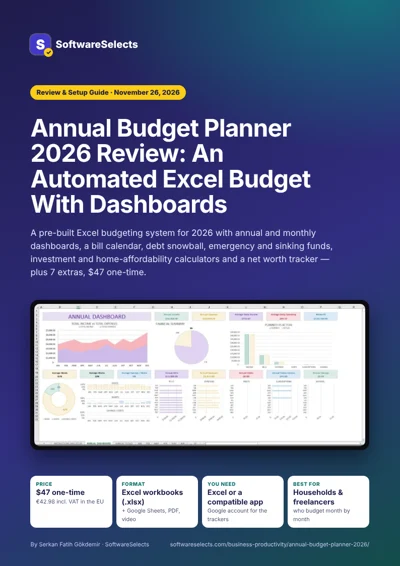
Everything on this page in a colourful, printable PDF: our verdict, all 8 resources explained, the price, the full setup guide, which file to use for your situation and a monthly checklist.
- Verdict & all 8 resources
- 8-step setup guide
- Which file for which job
- Monthly checklist
About this review
Who wrote it

Serkan Fatih Gökdemir
Founder and Editor, SoftwareSelects
Serkan builds websites, WordPress plugins and online calculator tools himself, so he looks at software the way a working user would. He has also worked for 15 years as a medical laboratory technician, with an education in chemistry, and brings the same habit of checking details carefully to every page: what a product actually does, what it costs, what the refund terms are and who it suits.
Sources: the seller’s Annual Budget Planner 2026 sales page, the Digistore24 order form and the Digistore24 listing, checked on November 26, 2026. Screenshots are the seller’s images of the actual files, with example data.
Questions about Annual Budget Planner 2026?
Tell our assistant how you get paid and what you want to track. It will tell you whether the planner fits and how to set it up.
Details are based on the seller’s website and the Digistore24 listing as of November 26, 2026 and can change — always confirm the price and refund terms at checkout. SoftwareSelects may earn a commission from purchases made through our assistant’s links, at no extra cost to you. Affiliate disclosure
